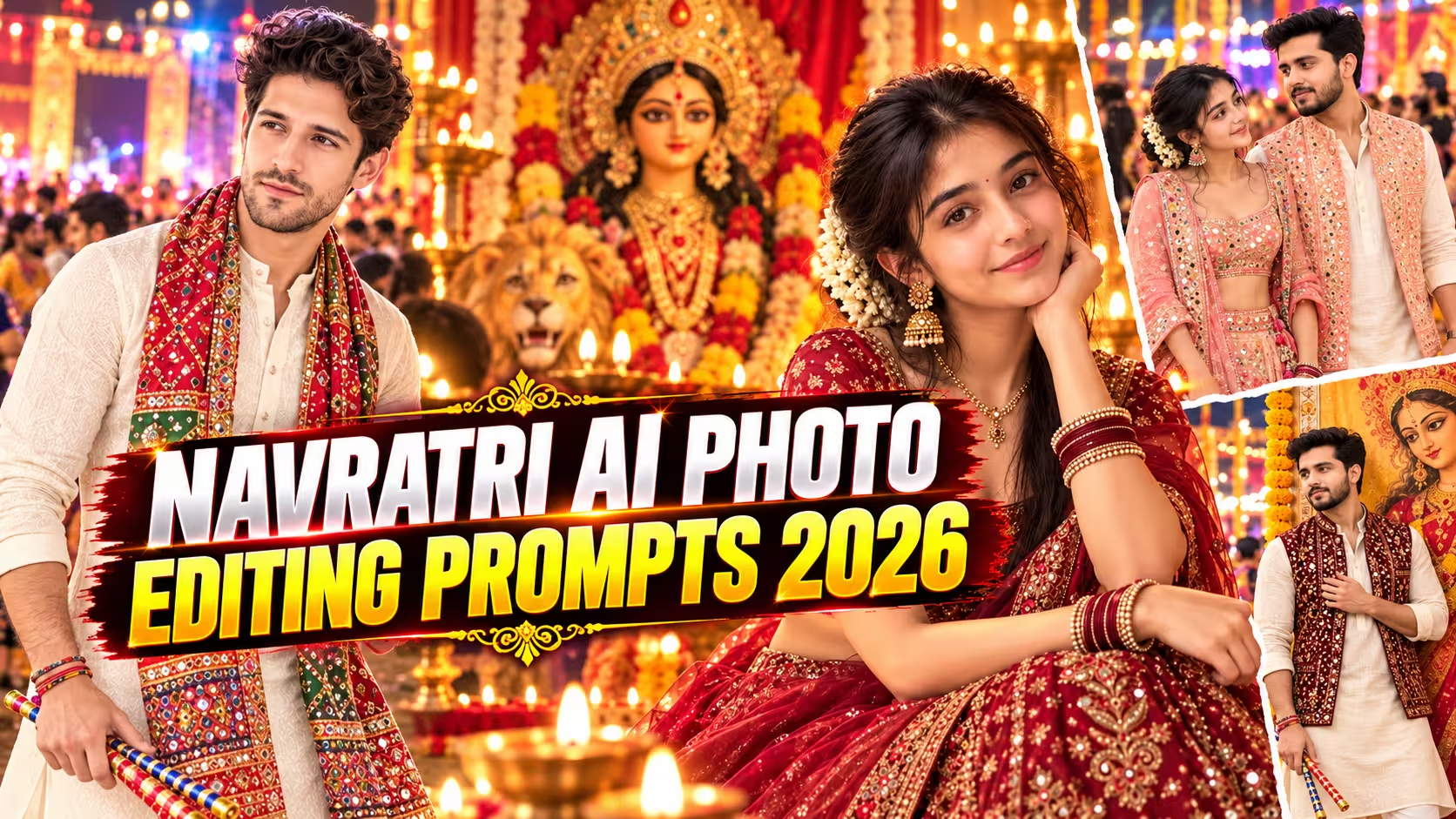
Navratri AI Photo Editing Prompts 2026
Navratri is the perfect time to try something creative with your photos. From traditional Garba outfits to beautiful pictures with Maa Durga, AI photo editing makes it possible to create festive images without visiting a professional studio.
You may have already seen people sharing colorful Navratri portraits, cinematic devotional photos, and traditional Gujarati looks on Instagram and WhatsApp. The good news is that you can create your own versions using ChatGPT or Google Gemini with a simple text prompt and a clear reference photo.
In this article, I have collected some of the best Navratri AI photo editing prompts for boys and girls, along with couple portraits, Garba photography, devotional scenes, Durga Puja looks, and a few AI video prompts. You can copy any prompt, upload your photo, and customize the outfit, background, lighting, and overall style according to your preference.
Table of Contents
- What Is Navratri AI Photo Editing?
- Why These Photos Are Going Viral This Year
- How to Make a Navratri AI Photo (Step by Step)
- Which Photo Should You Upload?
- Navratri AI Prompts for Boys
- Navratri AI Prompts for Girls
- Couple and Friends Prompts
- Durga Maa Blessing Prompts (Emotional Style)
- Dandiya Prompts Boys and girls
- How to Keep Your Face the Same
- Common Problems and Quick Fixes
- Tips for More Realistic Results
- How to Write Your Own Navratri Prompt
- Mistakes to Avoid
- Conclusion
- FAQs
What Is Navratri AI Photo Editing?
Navratri AI photo editing is simple. You upload one normal photo of yourself, paste a prompt, and an AI tool gives you back a festive picture. You in a chaniya choli at a Garba night. You standing next to a huge Durga Maa idol. You at a pandal with sparkler light on your face.
No Photoshop. No editing app. No skills. If you can type and tap, you can do it.
The whole trick is the prompt. A lazy prompt gives you a plastic-looking photo that doesn’t look like you. A good prompt gives you something people will ask about in your comments. That’s what this post is for. I’ve written the prompts so you can copy them as they are, and I’ve also explained why they work, so you can change them later.
Why These Photos Are Going Viral This Year
Navratri starts on 11 October and Vijayadashami is on 20 October. For about ten days, Instagram stories, WhatsApp statuses and Facebook feeds fill up with festive posts. Everyone wants something a bit different from the usual “Happy Navratri” forward.
AI photos fit perfectly. They look personal because you are in them. They take two minutes. And a photo of you receiving Maa’s blessing or dancing Garba feels a lot warmer than a stock image.
One more thing. Last year most people used Gemini for this. This year ChatGPT has become the first choice for many creators because it follows long, detailed instructions better and keeps faces more consistent. I’ll show prompts that work in both, so use whichever you like.
How to Make a Navratri AI Photo (Step by Step)
Here is the whole process. It works the same for boys and girls.
- Open ChatGPT or Gemini on your phone or laptop and log in.
- Tap the + icon (or the image icon) and upload your photo.
- Copy any prompt from this post and paste it into the message box.
- Hit send and wait 20 to 60 seconds.
- If you like the result, download it. If not, tap regenerate.
That’s really all of it. The two things that decide your result are the photo you upload and the prompt you pick. Let’s talk about the photo first.
Which Photo Should You Upload?
Most people skip this part and then complain that the face doesn’t match. Don’t be that person. Spend one minute choosing the right photo.
- Use a clear face photo. A selfie from the front camera is best. A back-camera photo also works if your face is big enough in the frame.
- Keep it natural. No heavy filters, no beauty mode, no blur. The AI copies what it sees, so if the photo is already edited, the result looks fake.
- Soft smile, not a big laugh. A small smile gives the AI an easy face to work with. Wide-open mouths often come out strange.
- Good light. Daylight near a window is perfect. Dark or very yellow light messes up skin tone.
- Crop to the shoulders. If your photo has a lot of background, crop it so only your face and shoulders are visible. This helps the AI focus.
- Only one person in the photo. For couple prompts, upload two clear photos instead of one group shot.
If the first result is off, don’t panic. Regenerate once or twice. The second or third try is often much better.
Navratri AI Prompts for Boys
For all prompts in this post, upload your photo first, then paste the prompt.
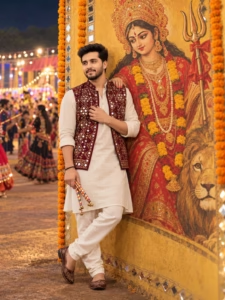
A photorealistic vertical full-length portrait in exact 3:4 aspect ratio recreating the composition, framing, scale, and atmosphere of the reference images[span_0](start_span)[span_0](end_span). In the foreground, a young South Asian man stands leaning back against a warm golden-yellow textured outdoor wall, looking thoughtfully off to the side with one hand resting gently across his chest and the other holding traditional decorated dandiya sticks. Faithfully preserve his recognizable facial identity, defined jawline, light beard and mustache, warm complexion, and messy textured dark wavy hair[span_1](start_span)[span_1](end_span). He wears traditional festive attire consisting of an off-white cotton kurta, matching relaxed churidar pants, and a sleeveless maroon Nehru jacket vest adorned with intricate mirror-work and embroidery; match the relaxed, loose-fit drape without making it tight or slim. Behind him, the wall features a large, majestic traditional painting of Goddess Durga adorned with an ornate golden crown, red bridal attire, layered gold jewelry, marigold flower garlands, and a red-cloth-tied Trishul, depicted with her painted hand resting gently on the man’s shoulder in blessing[span_2](start_span)[span_2](end_span). The wall is framed by a vertical border of mirrors and hanging marigold flower garlands, while the distant outdoor background shows a vibrant Navratri festival ground with blurred people, glowing strings of warm fairy lights, and festive night illumination. Authentic skin texture with visible natural pores, sharp focus on the subject, warm cinematic color grading, 8K Ultra HD quality[span_3](start_span)[span_3](end_span).
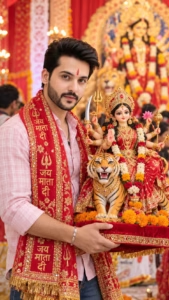
A photorealistic portrait of a smiling young Indian man in his mid-20s holding a beautifully detailed, stylized doll-like idol of the Hindu Goddess Durga seated on a tiger. The man has short dark wavy hair, a neat light beard, and a red tilak on his forehead. He is wearing a light pink checkered button-down shirt, blue jeans, and a vibrant red ceremonial cloth (chunri) with intricate gold embroidery and Hindi text draped over his shoulders. He is carrying the idol on a red velvet cushion lined with vibrant orange marigold flowers. The Goddess Durga idol has large, expressive anime-style eyes, elaborate gold jewelry, a red and gold sari, and multiple arms holding traditional weapons like a trident, sword, and lotus. The tiger is highly detailed and majestic. The background is a softly blurred, vibrant Durga Puja pandal festival scene with a larger out-of-focus idol, festive red and gold decorations, and a crowd of devotees. Shot on an 85mm lens, f/1.8 aperture for shallow depth of field, vivid warm festive lighting, DSLR quality, 8K resolution, ultra-detailed, cinematic composition
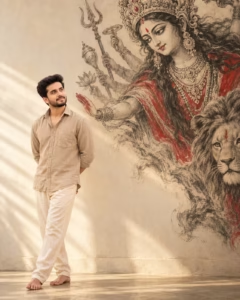
Create an ultra-realistic 4:5 premium devotional studio portrait using my uploaded image only as the strict facial identity reference. Do not copy the reference pose, expression, gaze, or body language. Place me on the far-left third, full body, with large negative space on the right. Use a warm cream-white plaster studio background. On the right, create a huge Durga Matha charcoal-and-ink mural, with her face high in the upper-right and multiple shadow arms extending diagonally toward me. One shadow hand appears above my shoulder in blessing. Pose: three-quarter profile, one foot forward, hands behind back. Gaze: looking upward toward Durga. Expression: peaceful subtle smile. Dusty-beige linen shirt, cream trousers, barefoot. Soft side lighting, 50mm DSLR look, premium editorial finish. Face same as reference image.
Navratri AI Prompts for Girls
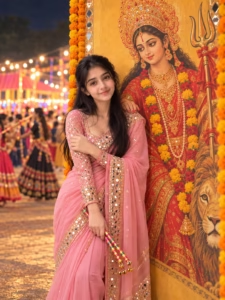
A photorealistic vertical portrait in exact 3:4 aspect ratio recreating the composition, framing, scale, and atmosphere of the reference image[span_0](start_span)[span_0](end_span). In the foreground, a young South Asian woman stands leaning gently against a warm golden-yellow textured wall[span_1](start_span)[span_1](end_span). Faithfully preserve her recognizable facial identity, fair complexion, subtle smile, and long dark wavy hair styled over her shoulders[span_2](start_span)[span_2](end_span). She rests one hand lightly near her opposite shoulder while holding traditional decorated dandiya sticks in the other[span_3](start_span)[span_3](end_span). She wears an elegant, loose and gracefully draped pastel pink saree with subtle golden borders, paired with a matching full-sleeved blouse adorned with mirror-work accents[span_4](start_span)[span_4](end_span). Behind her, the wall showcases a large, traditional painting of Goddess Durga adorned with an ornate golden crown, red attire, gold jewelry, and marigold garlands, depicted with her painted hand resting gently near the woman’s shoulder[span_5](start_span)[span_5](end_span). The wall is decorated with borders of fresh marigold garlands, while the outdoor festive background is bathed in soft, warm evening lighting[span_6](start_span)[span_6](end_span). Authentic skin texture with natural pores, sharp focus, natural color grading, 8K Ultra HD quality[span_7](start_span)[span_7](end_span).
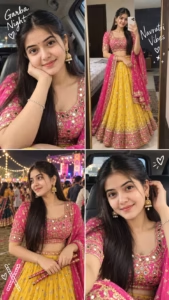
Create a highly photorealistic, four-panel collage (2×2 grid) of a beautiful young South Asian woman (late teens/early 20s) celebrating Navratri/Garba night. The Woman (Consistent across all panels): She has long, straight dark hair, a small red bindi on her forehead, and a warm, glowing complexion. She is wearing a traditional pink and gold embroidered chaniya choli: a pink blouse with intricate gold mirror work, a yellow skirt with gold prints, and a pink dupatta (shawl) with gold borders. She wears large, ornate gold jhumka earrings with small pearl drops and a delicate silver bracelet. Panel 1 (Top Left): A close-up selfie taken inside a car. She is resting her chin on her right hand, looking directly at the camera with a soft, sweet smile. White handwritten-style text in the top left corner reads “Garba Night” with a small heart doodle. Panel 2 (Top Right): A full-body mirror selfie taken in a bedroom. She is holding a white smartphone, showing her complete outfit. White handwritten-style text on the right side reads “Navratri Vibes” with small heart and sparkle doodles. Panel 3 (Bottom Left): An outdoor nighttime shot at a Garba event. She is standing in a crowd, looking off-camera to her left with a gentle smile. Behind her are blurred string lights, a decorated stage, and people in traditional attire. White doodles of a dandiya stick and a heart are in the bottom left. Panel 4 (Bottom Right): Another close-up selfie inside a car. She is looking directly at the camera with a calm, confident expression, her left hand touching her hair near her ear. A small white heart doodle with lines is in the top right. Lighting & Style: Warm, natural lighting in the car selfies; soft, ambient festive lighting for the outdoor shot. All panels are sharp, vibrant, and photorealistic, with a celebratory and joyful mood. 8k resolution, hyper-detailed, professional lifestyle photography, masterpiece, vertical aspect ratio (9:16).
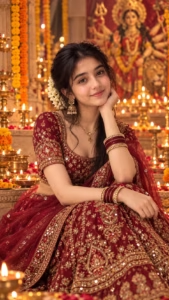
Create an ultra-photorealistic, high-end cinematic Navratri portrait of ME using my uploaded personal photograph as the PRIMARY and ONLY identity reference. Preserve my exact recognizable identity and natural appearance — face shape, facial proportions, eyes, eyebrows, nose, lips, jawline, cheekbones, skin tone, hairline, and all distinctive facial characteristics. Do not replace my face with the reference woman’s face, do not blend identities, and do not create a generic model face.
Use the uploaded reference image only for the overall pose, composition, camera perspective, festive styling, lighting, environment, and aesthetic inspiration.
Dress me in an elegant deep maroon/crimson designer lehenga choli with intricate antique-gold embroidery, delicate sequins and traditional Indian motifs, paired with a matching sheer maroon dupatta with a luxurious embroidered border. Add tasteful traditional gold jewellery — elegant jhumka earrings, delicate necklace, bangles and a small refined bindi. Keep the styling graceful, sophisticated and festive rather than overly embellished.
Create a beautiful Navratri devotional setting with numerous glowing brass diyas, marigold flower garlands, subtle rangoli, floating flower petals, warm candlelight and an elegant traditional temple-inspired interior. Add a softly blurred Goddess Durga-inspired devotional backdrop in the distance, keeping it subtle and respectful so the woman remains the clear focal point.
Lighting: warm golden diya light, soft amber highlights, gentle cinematic rim light around the hair, natural skin illumination, realistic shadows, subtle volumetric light and beautiful golden bokeh.
Pose: elegant seated portrait, relaxed posture, hands naturally positioned, calm confident expression, gentle subtle smile, looking naturally toward the camera.
Photography: premium Indian fashion editorial photography, cinematic period-drama aesthetic, shallow depth of field, realistic lens compression, natural perspective, highly detailed fabric texture, realistic jewellery reflections, authentic skin texture, individual hair strands, professional studio-quality composition.
Composition: vertical 9:16 social-media portrait, subject centered and prominently framed, enough negative space around the head and upper body, visually balanced foreground diyas and background bokeh, luxurious maroon-and-gold colour palette.
Absolute identity preservation: no face swapping, no identity blending, no facial reshaping, no slimming, no enlarging eyes, no changing nose/lips/jawline, no age alteration, no excessive beautification, no artificial skin smoothing. Preserve my natural facial character exactly.
Couple and Friends Prompts
For these, upload two clear photos (one of each person) and write which photo is which in your message, for example “Photo 1 is the boy, photo 2 is the girl”.
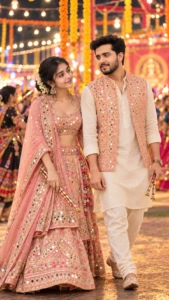
Use the uploaded couple photograph as the sole and highest-priority identity reference for BOTH people. Recreate the exact same man and woman from the reference photo in the new Navratri setting. Preserve both individuals’ recognizable identities exactly and naturally — exact facial identity and likeness, natural face shape and proportions, eyes, eyebrows, nose, lips, jawline and cheek structure, natural skin tone and realistic skin texture, hairline and overall appearance, age and authentic facial characteristics. Do not beautify, redesign, slim, reshape, age, de-age, or otherwise modify their faces.
Dress the woman in an elegant blush-pink, peach and champagne Gujarati lehenga choli, featuring intricate traditional mirror work, delicate floral embroidery and subtle pearl detailing. Style her hair in a low textured bun with loose curls and fresh jasmine flowers. Keep makeup elegant and realistic.
Dress the man in an elegant ivory traditional kurta, paired with a pastel peach embroidered Nehru-style jacket, cream churidar and traditional Gujarati mojari.
Capture the couple walking naturally together through a Navratri celebration, each holding traditional dandiya sticks, with warm glowing fairy lights, traditional marigold flower decorations, soft festive illumination and colorful garba dancers in the distant background. Photographed as if on a 70-200mm portrait lens, shallow depth of field, premium cinematic color grading, ultra-photorealistic, 8K-quality appearance, vertical 9:16 composition.
Dandiya Prompts Boys and Girls
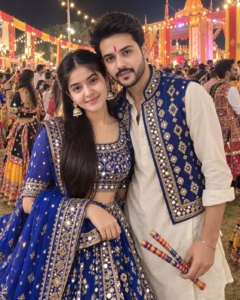
Ultra-realistic candid iPhone 15 Pro Max photograph of a clearly adult South Asian couple in their mid-20s at a beautifully decorated Navratri Garba night in Gujarat.
The woman wears a stunning royal-blue mirror-work chaniya choli with an elegant fully covered blouse and flowing dupatta. The man wears a coordinated ivory kurta with a royal-blue embroidered waistcoat. Their outfits complement each other without looking identical.
They are captured naturally between Garba steps, standing close together and looking directly into the camera with genuine smiles. The woman holds her dupatta lightly while the man casually holds a pair of dandiya sticks. Their posture feels spontaneous, energetic and youthful.
Hundreds of warm decorative lights, colorful Garba decorations, subtle crowd movement and traditional architecture create a vibrant background. Realistic warm festival lighting mixed with soft ambient evening light. Natural motion in the dupatta and clothing.
Authentic skin texture, visible pores, individual hair strands, realistic embroidery, mirror-work reflections and natural facial expressions. True-to-life colors, realistic shadows, no excessive saturation, no artificial glow.
The image should look like a real viral Instagram photograph captured during Navratri rather than an AI-generated festival poster. iPhone 17 Pro Max, 24mm equivalent lens, realistic smartphone photography, natural depth of field, photorealistic 8K, 4:5 vertical.
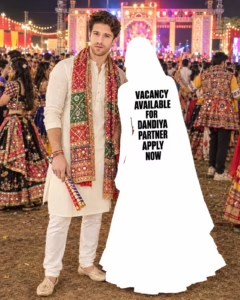
Use my uploaded photo as the ONLY identity reference. Create an ultra-realistic, high-resolution full-body photograph of me standing at a grand, crowded Navratri Dandiya night festival in India.
Identity preservation: Preserve my original face 100% accurately, including my facial features, face shape, hairstyle, beard, moustache, skin tone, and natural body proportions. Do not change my identity, make me look like someone else, or apply beauty filters. Keep my appearance natural and photorealistic.
Outfit: Dress me in a traditional off-white kurta with matching white pajama trousers, a long, colorful embroidered Gujarati bandhani dupatta around my neck, and traditional cream-colored embroidered juttis. Add a few colorful traditional bracelets. Keep the clothing realistic, with detailed fabric texture and natural folds.
Pose and composition: Show me standing confidently in a relaxed full-body pose, facing the camera with a slightly tilted head and a natural, serious expression. One hand holds a traditional decorated Dandiya stick pointing downward, while the other hand is positioned naturally beside my body.
Dandiya partner silhouette: Beside me, create a full-height, completely solid white silhouette of a woman wearing a traditional flowing Gujarati lehenga or chaniya choli with a wide flared skirt and dupatta covering her head. The silhouette must be pure white with no face, no visible skin, no clothing patterns, no internal details, and no transparency. Give the figure a realistic female outline and natural standing pose, as if she is my missing Dandiya partner. Position her close enough to me to create a believable couple composition, with a natural gap between our bodies.
Text on the white silhouette: Add bold, black, condensed uppercase typography centered on the upper torso of the silhouette, arranged exactly as follows:
VACANCY
AVAILABLE
FOR
DANDIYA
PARTNER
APPLY
NOW
Keep the text sharp, correctly spelled, evenly spaced, and easy to read. Use a bold Impact-style sans-serif font.
Background: A spectacular nighttime Navratri festival with a large illuminated stage, colorful LED lights, warm decorative bulbs, a dense crowd of people dancing Garba, and men and women wearing vibrant traditional Gujarati outfits. Include realistic ground texture, natural shadows, authentic festival decorations, and cinematic depth.
Photography: Professional event photography, realistic DSLR image, natural skin texture, accurate human anatomy, authentic fabric details, balanced exposure, realistic shadows, natural depth of field, and detailed background lighting. Make the image look like a genuine photograph captured at a real Indian Navratri celebration, not AI-generated artwork.
Framing: Vertical 4:5 Instagram portrait composition, full body visible from head to shoes, both the man and white silhouette completely inside the frame, with the stage and crowd visible behind them. Keep the main subjects centered and leave enough space around the edges to prevent Instagram cropping.
Strict negatives: No face changes, no body reshaping, no extra limbs or fingers, no distorted hands, no duplicate people in the foreground, no incorrect text, no colored or transparent silhouette, no cartoon effects, no artificial skin, no excessive retouching, no watermark, and no Instagram interface.
How to Keep Your Face the Same
This is the biggest complaint with AI photos, and it is fixable. Here’s what works for me:
- Say it clearly, and say it early. Start your prompt with a line like “Keep my face exactly the same as the uploaded photo.” Prompts that bury this line in the middle are less reliable.
- List the features. Writing “same eyes, nose, lips, jawline, skin tone, hairstyle” gives the AI more to hold on to than just “same face”.
- Say what NOT to do. “Do not beautify, reshape or smooth the face” stops the AI from giving you that over-polished look.
- Use a sharp reference photo. A blurry or heavily filtered photo is the number one reason for a face mismatch.
- Don’t ask for too much at once. A prompt with ten outfit details, five background elements and a complex pose takes attention away from the face. Keep the scene focused.
- Regenerate. Even with a perfect prompt, one try might miss. Try again before you change the prompt.
Common Problems and Quick Fixes
The face doesn’t look like me. Upload a clearer, front-facing photo, add the “keep face exactly the same” line at the start, and regenerate.
The hands look strange. Add “natural hands, five fingers, no distorted fingers” to the end of your prompt. Folded-hand namaste poses are especially tricky, so try a few times.
The photo looks too smooth or fake. Add “realistic skin texture, natural pores, not CGI, not a 3D render”.
The idol looks too modern or too cartoonish. Describe it specifically: the crown, the saree colour, the jewellery, the flowers, the lion. The more precise you are, the better it looks.
Text in the image is wrong. AI is still weak at text. If you need “Happy Navratri” on the photo, it’s safer to leave the text out and add it later using a free app like Canva.
The tool refuses or gives an error. Some tools are cautious with religious scenes or real faces. Reword the prompt slightly, or try the other tool.
Tips for More Realistic Results
- Mention the light: “warm golden pandal light”, “soft evening sunlight”, “fairy lights at night”.
- Add a camera feel: “shallow depth of field”, “DSLR photography”, “cinematic bokeh”.
- Pick a frame: say “9:16 vertical” for stories and reels, or “4:5” for Instagram posts.
- Add small details like marigold petals on the floor, smoke from incense, a brass diya. These tiny things make a photo feel real.
- Don’t overdo the quality words. Writing “8K, 4K, ultra HD, hyper-realistic, masterpiece” all together doesn’t help. One or two is enough.
- Edit lightly after. A small brightness bump or a bit of contrast in your phone gallery can make the final photo pop.
How to Write Your Own Navratri Prompt
Once you’ve used a few of the ones above, you’ll want to make your own. Here is a simple formula that works every time. Just fill in the blanks:
- Face line: “Keep my face exactly the same as the uploaded photo.”
- Who and what: age, gender, pose, expression. (“Standing with folded hands, soft smile.”)
- Outfit: colour, fabric, details. (“Red chaniya choli with mirror work.”)
- Deity or main object: the idol, the thali, the dandiya. Describe it properly.
- Background: pandal, Garba ground, temple, riverfront.
- Light and mood: golden hour, night lights, misty, dreamy.
- Format and rules: 9:16, no text, no watermark.
Here is an example built with that formula:
Keep my face exactly the same as the uploaded photo. I am standing with folded hands and a soft smile, wearing a royal blue kurta with gold embroidery. A large Durga Maa idol with a red saree and a gold crown stands behind me, surrounded by marigold garlands and lit diyas. The setting is a decorated pandal at night with warm lights and a slightly blurred crowd. Cinematic, realistic skin texture, 9:16 vertical, no text, no watermark.Mistakes to Avoid
- Using a low-quality photo. It’s the single biggest reason for bad results.
- Writing very short prompts. “Navratri photo of me” gives you a random result. Details give you control.
- Asking for too many changes at once. Make the first image, then ask for small edits one by one.
- Giving up after one try. Regenerating is free. Use it.
- Using someone else’s photo without asking. Only upload your own pictures, or photos of people who are fine with it. Please don’t make AI photos of other people without their permission.
- Posting without checking. Zoom in and check hands, eyes and the idol before you share. A small glitch is easy to miss on a phone screen.
- Treating the idol casually. Navratri is a religious festival. Keep the scene respectful, and avoid funny or disrespectful edits involving the goddess.
Frequently Asked Questions (FAQs)
Which is better for Navratri photos, ChatGPT or Gemini? Both work. ChatGPT tends to follow long prompts more closely and hold the face better. Gemini is quick and free for many users. If one doesn’t give a good result, try the other with the same prompt.
Are these prompts free? The prompts are free to copy. The tool you use may have its own daily limits or paid plans, depending on your account.
Do I need to upload a photo? For a result that looks like you, yes. Without a reference photo, the AI will create a random person.
Can girls use the boys’ prompts, and the other way around? Yes. Just change the outfit and a few words in the prompt, such as “kurta” to “chaniya choli”.
Why doesn’t the face match on the first try? Usually it’s the reference photo. Use a clear, unfiltered, front-facing photo, keep the “same face” line at the start of your prompt, and regenerate.
Can I add the text “Happy Navratri” to the image? You can try, but AI often misspells text. The safer way is to generate the photo without text and add the words in Canva or any editing app.
What size should I use for Instagram stories? Use 9:16 vertical. For regular Instagram posts, 4:5 works well.
Can I make a video from my AI photo? Yes. Create the photo first, then use it as the starting frame in an image-to-video tool, and use one of the video prompts above.
Can I use these photos on my business page or sell them? For personal posts, it’s fine. For commercial use, check the terms of the AI tool you used.
When is Navratri 2026? Navratri begins on 11 October 2026 and Vijayadashami (Dussehra) falls on 20 October 2026.
Conclusion
That’s the full set. You now have over 30 ready-to-use prompts, a simple way to pick the right photo, fixes for the usual problems, and a formula to write your own.
My suggestion: start with one prompt, not ten. Pick the one that fits your photo best, run it, and see what you get. Then tweak the outfit, the background or the light until it feels like your photo. That’s how people end up with images that look different from everyone else’s.
Navratri begins on 11 October and runs until Vijayadashami on 20 October, so you have plenty of time to try a few styles and post a new one each day. If you try any of these, tag us on Instagram. We’d love to see what you made.
Happy Navratri, and see you in the next post!