
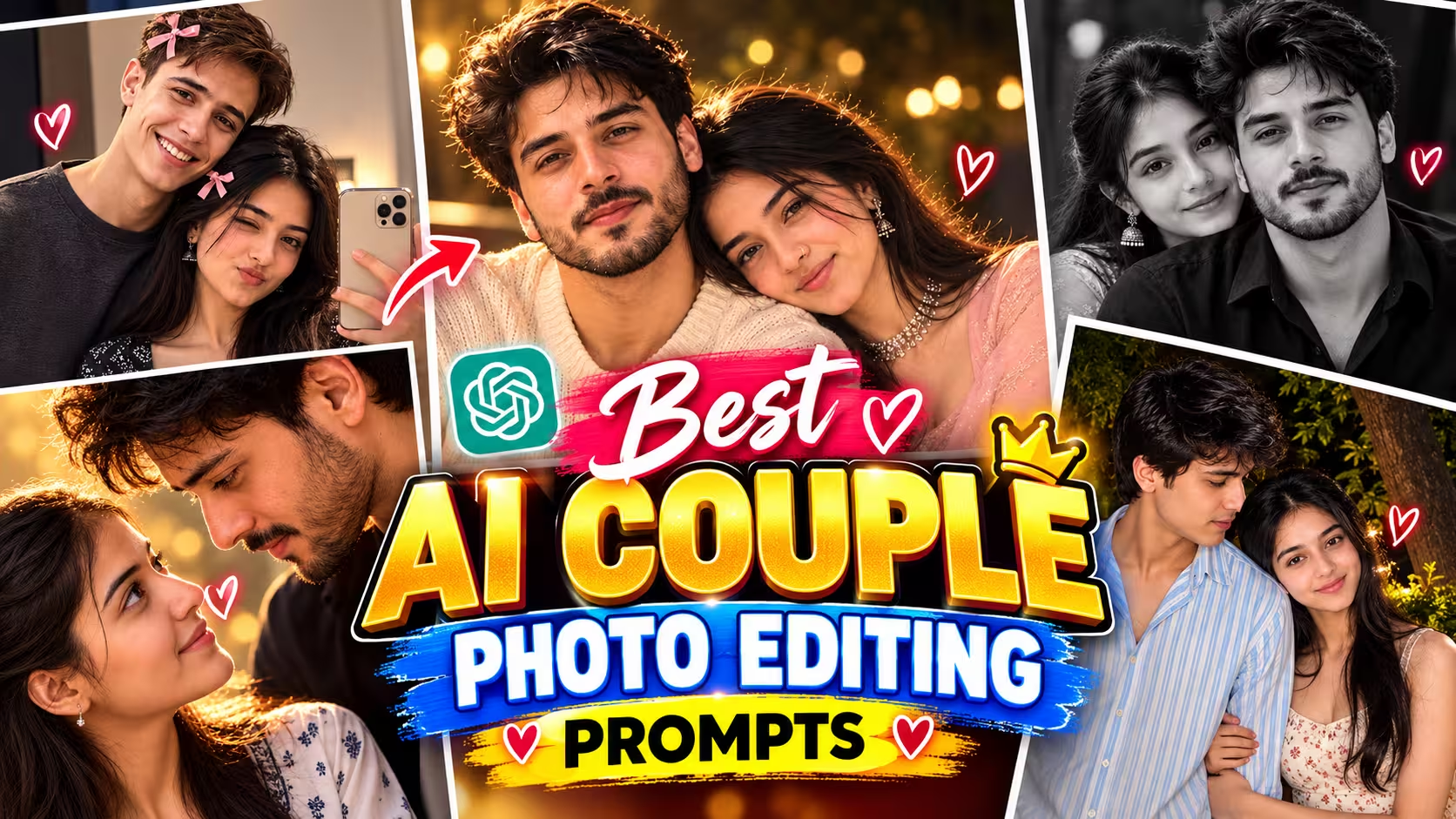
Best AI Couple Photo Editing Prompts 2026 – Romantic, iPhone & Mirror Selfie
Want to create beautiful romantic couple photos using AI without losing the natural look of your face? You can turn your ordinary photos into cinematic portraits, aesthetic iPhone wallpapers, close-up romantic shots, mirror selfies, and realistic night photography with the right AI photo editing prompts.
In this guide, you will find carefully written AI couple photo editing prompts for 2026 that you can copy and use with compatible AI image editing tools. Whether you want a black-and-white iPhone lock screen, a romantic close-up portrait, a candid flash selfie, or a cozy mirror selfie, these prompts will help you achieve a more natural and professional-looking result.
The most important thing is to upload clear reference photos and explain exactly what should change. If you want to keep your real identity, tell the AI to preserve your facial features, skin texture, hairstyle, and natural appearance instead of generating a completely new face.
“`html
What Is AI Couple Photo Editing?
AI couple photo editing is a creative way to transform existing photographs using artificial intelligence. Instead of manually adjusting every detail in an editing app, you describe the look you want in a text prompt and provide reference images when supported.
For example, you can turn two separate portraits into a romantic-looking couple composition, create a cinematic black-and-white photograph, design a stylish smartphone wallpaper, or make a casual mirror selfie look more polished.
The best part is that you can guide the editing process with natural English. You do not need advanced photography or Photoshop skills to get started.
For the most realistic results, use an image-editing feature that accepts reference photographs. A text-only image generator may create new faces rather than preserve the people in your uploaded photos.
Why Are Romantic AI Couple Photos Trending in 2026?
Romantic AI portraits are popular among people who enjoy aesthetic wallpapers, social media posts, couple photography, and creative photo transformations.
Here are a few reasons people enjoy experimenting with these prompts:
- Personalized wallpapers: Create a lock-screen image featuring a couple in a cinematic style.
- Realistic photography effects: Reproduce the look of an iPhone flash selfie or professional camera portrait.
- Creative compositions: Experiment with close-ups, mirror selfies, and face-to-face portraits.
- Different moods: Choose warm golden lighting, monochrome photography, or a dark outdoor background.
- Easy editing: Describe the desired result instead of adjusting every setting manually.
Remember that AI results vary depending on the editing tool, reference image quality, and how precisely you describe the composition.
How to Create AI Couple Photos Step by Step
Follow these simple steps before using any of the prompts below.
- Choose your reference photos. Select clear, well-lit pictures of both people. Front-facing images are generally easier for identity preservation.
- Open an AI image editor. Choose a tool that supports uploading reference images and editing an existing photograph.
- Upload the correct images. Add both people’s photos if the tool supports multiple references. Specify which person is the boy and which is the girl.
- Copy your preferred prompt. Choose a style from the collection below and paste the complete prompt into the editor.
- Describe what must remain unchanged. Mention the original face, hairstyle, skin tone, clothing, and natural facial details.
- Generate and review the result. Check the faces, hands, lighting, proportions, and background.
- Make small corrections. If the image changes your identity or clothes, repeat the edit with more specific instructions.
Pro tip: If preserving the exact face is your main priority, edit the original image instead of asking the AI to recreate the people from scratch.
Best AI Couple Photo Editing Prompts
The following prompts cover different romantic photography styles. Copy the prompt for the look you prefer and replace any optional details to match your reference photos.
1. Black-and-White iPhone Lock Screen
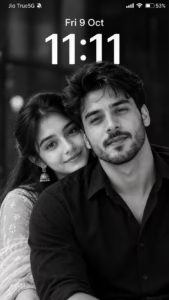
Create an ultra-realistic black-and-white iPhone lock-screen screenshot in an exact 9:16 vertical ratio (1080×1920). Use the uploaded boy’s and girl’s photos as facial identity references, preserving their recognizable faces, natural features, hairstyles, and skin textures. Recreate an intimate couple portrait: the man in the foreground on the right, wearing a black collared shirt, looking downward with a gentle smile. The woman stands slightly behind him on the left, with long dark hair, traditional earrings, and her lower face partly hidden behind his shoulder. Use cinematic monochrome lighting, deep blacks, silver-gray highlights, realistic skin details, and a softly blurred dark background. Add authentic iOS-style white text and icons: “Jio True5G” with a muted-bell icon at top-left, cellular signal, Wi-Fi, and 53% battery at top-right. Display “Fri 9 Oct” and a large centered “11:11” clock. No colors, notifications, borders, watermarks, or extra text.
2. Romantic Face-to-Face Close-Up
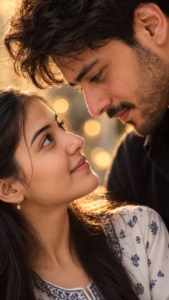
Create an ultra-realistic, highly detailed vertical 9:16 romantic close-up portrait of a young adult couple, inspired by the reference image.
Show only an extreme close-up of their faces in opposite orientations, with their eyes meeting intimately in the center of the frame. The man is positioned above and the woman below, both faces tilted naturally toward each other. Capture their eyes, eyelashes, eyebrows, skin texture, and subtle facial details with exceptional realism.
Use warm cinematic skin tones, soft natural lighting, shallow depth of field, and beautiful golden bokeh lights in the background. The composition should feel intimate, emotional, elegant, dreamy, and romantic.
Keep the framing tight and artistic, with the eyes as the main focal point. Natural skin texture, realistic pores, detailed eyelashes, authentic facial proportions, soft highlights, cinematic color grading, professional photography, 85mm macro-lens look, ultra sharp eye details, soft background blur, IMAX-level realism, high dynamic range, 8K quality.
No text, no watermark, no distortion, no extra facial features, no artificial-looking skin.
Vertical smartphone wallpaper composition, 9:16 aspect ratio.
Use the uploaded reference photos to preserve both individuals’ exact facial identity, facial features, skin tone, hairstyle, and natural appearance. Do not change or beautify their faces.Make them strictly face-to-face, with their eyes directly meeting each other in the center
3. Aesthetic iPhone Lock Screen Portrait
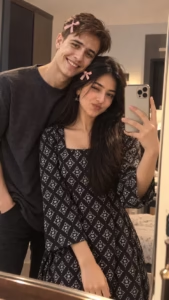
Create an ultra-realistic romantic mirror selfie using my uploaded photos as the STRICT MAIN IDENTITY REFERENCES for both the boy and girl. Preserve their exact facial features, face shape, eyes, nose, lips, hairstyle, skin tone, age and natural skin texture. Recreate the same composition as the reference: the couple standing very close together in front of a large mirror, the boy slightly behind/left of the girl with his head gently touching hers, and the girl holding a smartphone in front of the mirror. Give the girl a playful wink and cute pout, while the boy has a soft natural smile. Keep a cozy indoor bedroom/dressing-room setting, warm soft lighting, realistic reflections and natural skin details. Add cute small pink bows in their hair, matching the reference style. Keep the image candid, youthful, romantic and photorealistic, with realistic proportions, clothing texture and DSLR-quality detail.
4. Realistic iPhone Flash Selfie
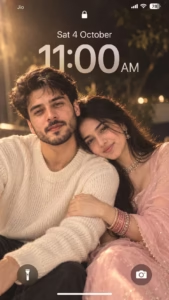
Create a dreamy, ethereal iPhone lock screen screenshot featuring an extreme close-up portrait of a young couple. Preserve the facial identity and natural facial features of both people from the uploaded reference photos. The man and woman are sitting very close together in a soft romantic pose. The woman gently rests her head on the man’s shoulder, lightly holding his arm, while both have subtle, peaceful smiles.
The man has natural curly dark hair and wears a soft cream/white knitted sweater. The woman has long, open dark hair with soft loose strands around her face and wears an elegant light baby-pink saree with a matching short-sleeve blouse. She is adorned with a sparkling diamond choker necklace, matching drop earrings, a delicate nose ring, and stacked dark-pink and gold glittering bangles.
Give the portrait a dreamy vintage romantic aesthetic with warm golden flashlight illumination, soft glow around the hair, subtle motion blur, shallow depth of field, delicate film grain, creamy highlights, slightly faded colors and soft bokeh. Keep realistic skin texture and natural facial proportions. Make it look like an authentic candid photograph captured with direct flash, not an AI illustration.
Overlay a realistic iPhone lock-screen UI. At the top show the lock icon, signal/Wi-Fi/battery indicators. Display “Sat 4 October” above a large translucent “11:00 AM” clock. Add the circular flashlight icon at the bottom-left and camera icon at the bottom-right, with the white home indicator at the bottom.
Keep both faces clearly visible while allowing enough negative space around the upper area for the clock. Premium romantic wallpaper aesthetic, dreamy flash photography, vintage softness, photorealistic, ultra-detailed, 9:16 vertical composition.
5. Outdoor Night Couple Photography
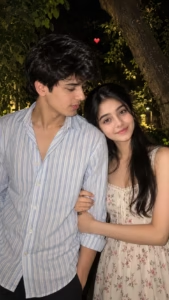
Create an ultra-realistic candid night-time portrait of a young couple standing closely together outdoors in a natural garden setting. Use the uploaded reference photo as the identity reference and preserve the same facial identity, facial structure, skin tone, hairstyle, and recognizable features of both people.
The young man is standing on the left, slightly turned toward the girl, looking at her affectionately. He has naturally styled slightly messy black hair and light facial stubble. He is wearing a loose-fitting light blue and white vertically striped button-up shirt with the top buttons casually open, creating a relaxed everyday look.
The young woman is standing beside him on the right, facing the camera with a soft, natural expression. She has long, voluminous dark curly/wavy hair falling naturally around her shoulders, subtle elegant makeup, defined eyes, and natural lips. She is wearing a delicate cream/off-white floral sleeveless dress with small pink and green flower patterns. Her arm is gently wrapped around the man’s arm/waist, creating a sweet and intimate couple pose.
Capture the image as a spontaneous smartphone/DSLR-style photograph taken at night with direct camera flash. The flash should naturally illuminate their faces and clothing while the background remains dark and atmospheric. Behind them, include dense green tree branches, leaves, and a large tree trunk, creating a realistic outdoor garden atmosphere.
Use a natural close-up portrait composition, with both people filling most of the frame. Preserve realistic skin texture, individual hair strands, natural shadows, realistic fabric details, accurate anatomy, and authentic facial expressions. Add a small red heart emoji/sticker floating naturally above and between their heads.
Photography style: ultra-realistic, candid couple photography, nighttime flash photography, realistic smartphone camera look, natural colors, sharp facial details, subtle background blur, authentic lighting, high detail, 4K quality, photorealistic.
Important: Do not make the faces look artificial or overly beautified. Maintain the exact identity and natural appearance of the uploaded people. Avoid distorted hands, extra fingers, duplicated body parts, unnatural eyes, plastic skin, excessive HDR, or cartoon-like features.
6. Cinematic Romantic Couple Portrait
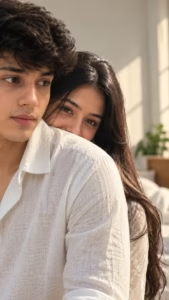
Create an ultra-realistic vertical portrait of two people in a bright, minimal indoor room with soft natural window light. A close-up over-the-shoulder composition shows the foreground person on the left wearing a light White textured linen shirt, with only part of the face visible in a cinematic crop. Behind them, the second person playfully peeks over the shoulder, revealing only one expressive eye and part of the forehead, with long straight center-parted hair. Soft diffused lighting, creamy skin tones, shallow depth of field, realistic fabric texture, natural color grading, 85mm lens, f/1.8, DSLR-quality, photorealistic, cinematic framing, elegant lifestyle aesthetic, HDR, 8K. Negative: blurry, low quality, extra limbs, duplicate people, deformed face, watermark, logo, text, CGI, cartoon, oversaturated colors.
How to Keep Your Face and Identity Unchanged
One of the biggest challenges in AI couple photo editing is maintaining the original identity of both people. Even a detailed prompt cannot guarantee a perfect match because some image generators reconstruct faces when changing the pose, lighting, or camera angle.
Use the following techniques to improve consistency.
- Use clear reference images: Choose photographs with visible eyes, a clear face, and minimal obstruction.
- Edit instead of regenerating: Use an image-to-image editing mode whenever available.
- Give each person a clear role: Specify which reference belongs to the boy and which belongs to the girl.
- Describe the permitted changes: State whether you want to change only the background, lighting, pose, or composition.
- Keep the prompt focused: Too many conflicting instructions can produce unpredictable results.
- Check both faces: Compare the generated image with the original references before using it.
- Make smaller edits: Changing one element at a time often makes it easier to preserve identity.
For edits where identity is the highest priority, use this additional instruction:
Preserve the original identity of both people as closely as possible. Do not intentionally redesign their faces or alter their natural facial characteristics. Keep their original hairstyles, skin tones, and recognizable features. Change only the specific elements requested in this prompt.
Remember: AI tools may still modify facial details. If the result does not look like the original people, try a different reference image or a more conservative edit.
Which Photos Should You Upload?
The quality of the reference photos can make a noticeable difference to the final result.
| Photo type | What works best |
|---|---|
| Face close-up | Clear eyes, visible facial features, and good focus |
| Couple portrait | Both people visible with enough space around their faces |
| Mirror selfie | A clear mirror, realistic phone position, and visible reflections |
| Night photography | A reference with identifiable facial details and reasonable exposure |
| Clothing-preservation edit | Original photographs showing the complete outfit |
| Lock-screen wallpaper | A portrait with enough space for the clock and status icons |
If you upload separate photos of two people, check whether your chosen AI editor supports multiple identity references. Some tools support only one primary image or may blend facial characteristics when several references are provided.
Only upload photos you own or have permission to edit, especially when creating romantic or intimate compositions involving another person.
Best AI Tools for Couple Photo Editing
You can experiment with these tools, depending on their current image-editing capabilities and your requirements.
- Google Gemini: Useful for natural-language image editing when the available version supports reference-image uploads.
- ChatGPT image generation and editing: Useful for describing a desired composition and making image changes through supported image workflows.
- Adobe Photoshop: Useful for manually correcting backgrounds, adjusting lighting, and refining details after AI generation.
- Canva: Useful for arranging the final wallpaper, adding text, and adjusting the composition.
The available features may vary by plan, region, and product version. Always check whether the selected tool supports the kind of reference-based editing you need.
Common Problems and Easy Fixes
Problem 1: The AI changes the face
Why it happens: The model may reconstruct the face while changing the pose, lighting, or camera angle.
Fix: Use a clear reference photo, edit the original image directly, and reduce the number of requested changes.
Problem 2: Both faces look mixed together
Why it happens: The tool may not distinguish between the two identity references.
Fix: Clearly label each reference and specify which person belongs in each position in the composition.
Problem 3: The clothes change
Why it happens: The image editor may generate new clothing when it creates a different pose or environment.
Fix: Explicitly request that the original clothing remain unchanged and use a reference showing the outfit clearly.
Problem 4: The eyes look unnatural
Why it happens: Extreme close-ups and face-to-face compositions require precise alignment.
Fix: Use front-facing references, simplify the requested pose, and regenerate if the eyes or facial proportions look incorrect.
Problem 5: The iPhone text is incorrect
Why it happens: Image generators do not always render exact typography, dates, percentages, or interface icons.
Fix: Generate the clean portrait first and add the clock, date, battery indicator, and other elements manually afterward.
Problem 6: The photo looks too artificial
Why it happens: Excessive cinematic effects, skin smoothing, or overly complicated instructions can reduce realism.
Fix: Request natural skin pores, realistic lighting, subtle imperfections, believable shadows, and minimal retouching.
Tips for More Realistic AI Couple Photos
Follow these practical tips to get better results from the prompts.
- Describe the camera angle clearly. Specify whether you want a front-camera selfie, mirror selfie, close-up portrait, or waist-up composition.
- Use realistic lighting instructions. Direct flash, soft window light, and golden-hour lighting produce different results.
- Avoid contradictory expressions. If one person should wink, describe the other person’s expression separately.
- Keep backgrounds simple. A less complicated background can help keep attention on the faces.
- Choose the correct aspect ratio. Use 9:16 for smartphone wallpapers and vertical social-media posts.
- Do not overuse quality keywords. A clear description of the composition and lighting is usually more useful than repeating “8K” or “ultra-realistic” many times.
- Inspect the final image. Look for unnatural hands, distorted eyes, incorrect reflections, and unwanted changes to the clothing.
- Use a final manual edit. A photo editor can help correct small details that the image generator cannot reproduce accurately.
Mistakes to Avoid
Avoid these common mistakes when creating AI couple portraits:
- Uploading blurry or heavily filtered reference photos.
- Expecting a text prompt alone to guarantee exact facial identity.
- Asking for several completely different poses and environments in one generation.
- Forgetting to specify which person should appear on the left or right.
- Requesting an extreme close-up when the reference photographs show very different angles.
- Ignoring incorrect reflections or duplicated objects in mirror selfies.
- Using inaccurate clock text without checking the final image.
- Uploading another person’s photograph without permission.
- Assuming that every AI tool can preserve original clothing and faces perfectly.
A clear prompt and a suitable reference photograph usually provide a better starting point than an extremely long list of unrelated effects.
Frequently Asked Questions
1. How do I create AI couple photos using my own pictures?
Upload clear reference photographs to an AI editor that supports image editing. Choose one of the prompts in this guide, describe the composition, and specify which details should remain unchanged. Review the output and refine it if needed.
2. Which AI tool is best for romantic couple photo editing?
The best tool depends on the result you want. Gemini and ChatGPT can help with natural-language image editing where supported, while Photoshop is useful for detailed manual corrections and Canva is helpful for final layouts.
3. Can AI preserve both faces exactly?
No tool can guarantee perfectly unchanged faces in every edit. Reference-based editing and conservative changes can improve consistency, but you should compare the result with the original photographs.
4. What aspect ratio is best for an iPhone wallpaper?
A vertical 9:16 composition is a useful starting point for smartphone wallpapers. For a specific iPhone model, check its screen resolution and adjust the final crop to fit the display.
5. How do I create a romantic close-up where both people look at each other?
Use the face-to-face close-up prompt. Specify the position of each face, ask for direct eye contact, and upload reference images with clearly visible eyes. You may need to generate several variations to achieve natural alignment.
6. How can I keep the original clothes unchanged?
Use reference images where the clothing is clearly visible. Add an explicit instruction to preserve the original colors, patterns, fabrics, fit, and accessories. Avoid requesting a completely different body pose if the outfit must remain identical.
7. Why does AI change the background but also change my face?
Many image-generation systems recreate parts of the entire image rather than modifying only the background. Use an editing mode with selective changes or a masking feature if available, and keep the requested edits limited to the background.
8. Can I add an iPhone clock and battery indicator using an AI prompt?
You can request them, but the generated text and icons may be inaccurate. For the cleanest result, create the portrait first and add the clock and interface elements separately using a suitable design or photo-editing tool.
9. Are these AI couple photo editing prompts free to use?
The prompts in this article are provided for you to copy and experiment with. Whether you can generate images for free depends on the tool, its usage limits, and your subscription.
10. Can I use these images on Instagram or as my profile picture?
Yes, subject to the image tool’s terms and any applicable rights or permissions for the photographs. Before sharing a romantic edit, make sure the other person has consented to the use of their image, particularly if the edit could be mistaken for a real photograph.
Final Thoughts
Creating beautiful AI couple photos does not have to be complicated. With a clear reference image, a focused prompt, and a suitable image-editing tool, you can experiment with romantic close-ups, monochrome iPhone wallpapers, candid flash selfies, mirror selfies, and cinematic portraits.
Start with the style you like most, preserve the natural appearance of both people, and make small changes until the result looks right. If keeping the original face and clothing is important, prioritize reference-based editing instead of recreating the entire photograph.
Save this guide for your next photo-editing project, and explore more creative AI prompts on PromptByVishu.com.