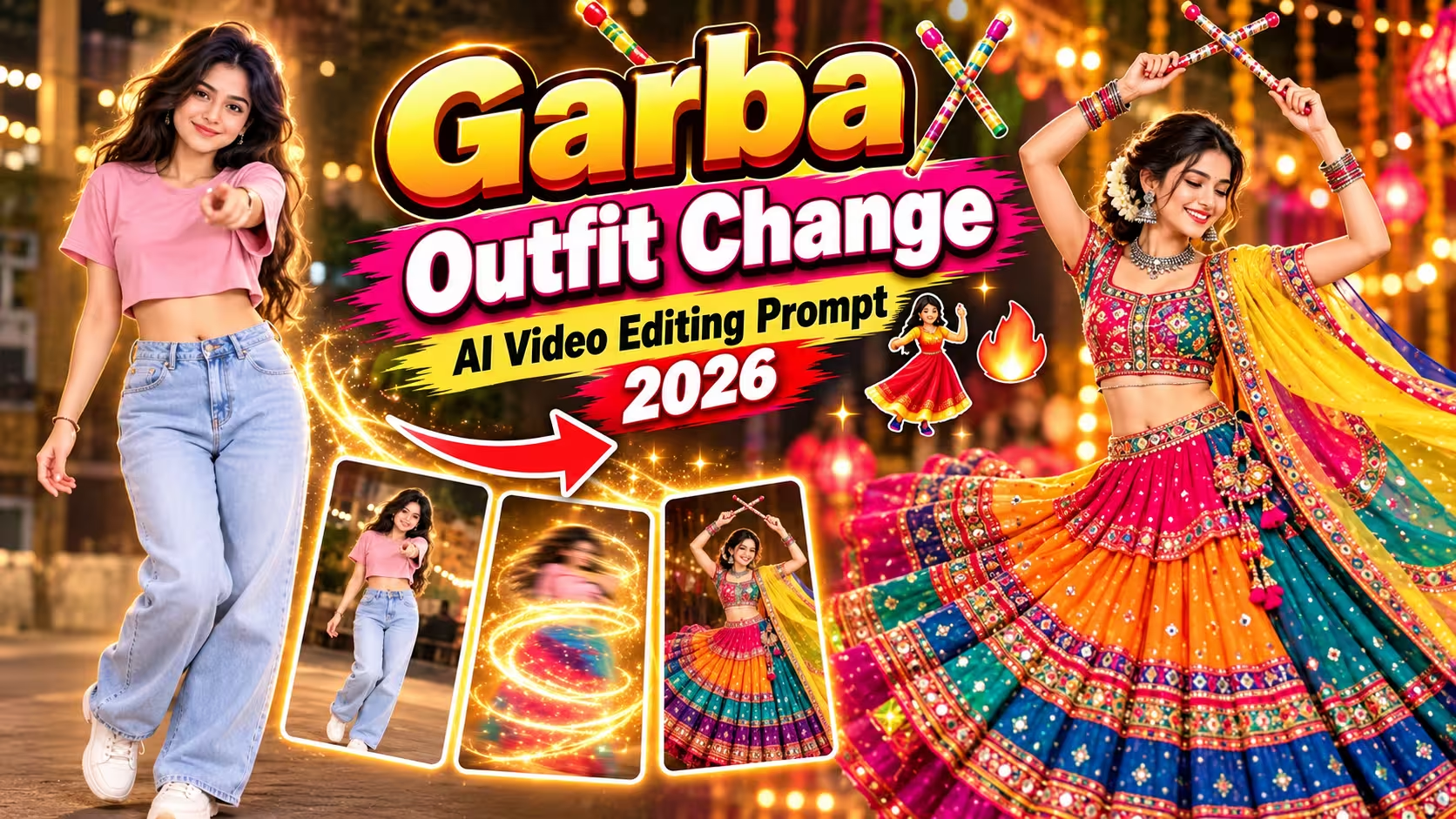
Garba Outfit Change AI Video Editing Prompt 2026
Want to create a beautiful Garba outfit transformation video for Navratri 2026? With an AI video generator, you can turn a simple photo into a colourful festive fashion video featuring traditional Gujarati outfits, sparkling mirror work, jewellery, and stylish transitions.
The Garba Outfit Change AI Video Editing Prompt 2026 helps you create a video where your outfit changes from casual clothes into different traditional Garba looks. You can use this idea to make creative Instagram Reels, YouTube Shorts, and other short videos.
You do not need advanced video editing skills to get started. Choose a clear reference photo, copy the AI prompt given below, and try it in a compatible image-to-video tool such as Google Flow. The exact features available may depend on your account and the tool you use.
In this guide, you will find a ready-to-use Garba outfit change prompt, easy instructions, outfit ideas, editing tips, and answers to common questions.
Table of Contents
- What Is Garba Outfit Change AI Video Editing?
- Why Is the Garba Outfit Change Trend Popular?
- Best Garba Outfit Change AI Video Prompt 2026
- How to Create a Garba Outfit Change AI Video
- Best AI Tools for Garba Outfit Transformation
- Tips for Getting the Best AI Video Results
- How to Edit and Share Your Navratri Reel
- Common Problems and Their Solutions
- Frequently Asked Questions
- Final Words
What Is Garba Outfit Change AI Video Editing?
Garba outfit change AI video editing is a creative way to transform a person’s clothing into traditional Gujarati festive wear using artificial intelligence.
For example, your video can begin with you wearing a simple T-shirt and jeans. A quick flash or glitch transition can then reveal a colourful chaniya choli, traditional jewellery, bangles, and a matching dupatta.
You can even create multiple outfit changes in one short video. Each transformation can feature a different colour combination, embroidery style, or festive look.
The main goal is to keep the person recognisable while changing the clothes and styling. Results can vary depending on the reference image, the AI model, and the prompt.
Best Garba Outfit Change AI Video Prompt 2026
Create a 10-second vertical 9:16 cinematic fashion reel using the uploaded image as the girl’s reference. Keep her exact face, identity, skin tone, eyes and facial features unchanged in every shot.
Fixed top-down 90° camera, no camera movement or zoom. Girl lies on a tan woven carpet, with a dusty-pink curved velvet sofa on the left and part of a chrome lamp base at the bottom. Warm soft studio lighting, realistic 4K fashion photography.
0–2.5s: Casual look — dusty-pink oversized cropped T-shirt, light-blue baggy jeans, smartwatch, barefoot. She smiles at the camera and points a silver TV remote upward, clicking it.
2.5–5s: A fast TV channel-change flash/glitch instantly transforms her outfit. She now wears a colorful rainbow Gujarati chaniya choli with magenta, orange, teal, purple and olive-green tiers, gold mirror-work, fuchsia-teal blouse, neon yellow-green dupatta, silver jhumkas, colorful bangles, red flower bun and golden sandals. She holds crossed dandiya sticks above her head, smiling, with the skirt spread around her.
5–7.5s: Another quick flash/glitch. She changes into a black Kutchi patchwork outfit with a black flared skirt, colorful patchwork hem, pink beaded blouse, black mirror-work dupatta, silver jhumkas and oxidized bangles. Hair in a neat bun. She rests her head on one hand and smiles softly.
7.5–10s: Final flash/glitch. She changes into a white-panel Navratri lehenga with mustard, purple and hot-pink panels, mirror-work border, pink-gold blouse and white patchwork dupatta. Red flower in bun. She smiles and gently waves at the camera.
Keep her body position and background unchanged during every transformation. Natural blinking, subtle head and hand movement, realistic fabric and dupatta movement. Premium Indian festive fashion reel, rich colors, sharp embroidery and mirror-work, realistic skin and fabric.
Negative: face change, identity change, distorted hands, extra fingers, outfit mixing, wrong colors, blurry details, camera movement, zoom, text, logo, watermark, cartoon look, flickering.
Why Is the Garba Outfit Change Trend Popular?
Outfit transformation videos are a fun way to create festive content without recording every look separately.
Here are a few reasons to try this style:
- Quick outfit transitions: Show multiple Garba looks in one short video.
- Traditional fashion: Include colourful lehengas, mirror-work blouses, dupattas, and jewellery.
- Creative effects: Use flash, glow, or glitch transitions to reveal each new outfit.
- Reel-friendly format: A vertical video works well for Instagram Reels and YouTube Shorts.
- Easy customisation: Experiment with different colours, poses, backgrounds, and accessories.
You can also personalise the concept with your favourite Garba song and beat-synchronised transitions.
Best AI Tools for Garba Outfit Transformation
You can explore the following tools for your project. Features, access, pricing, and supported video formats may change over time.
1. Google Flow
Google Flow is an AI filmmaking tool worth exploring for cinematic video creation. Check its current image-reference and video-generation options before starting.
Website: https://flow.google.com/
2. Google Gemini
Gemini can help you develop and refine prompts or create images where supported. Video generation features depend on the available model and your account access.
Website: https://gemini.google.com/
3. A Video Editing App
After generating your video, use an editor such as VN or CapCut, where available, to trim clips, add music, adjust timing, and polish transitions. These apps are useful for finishing the video, even when the AI generation happens elsewhere.
How to Create a Garba Outfit Change AI Video
Follow these simple steps to create your own Navratri transformation video.
Step 1: Choose a Clear Reference Photo
Select a good-quality photo where your face and hairstyle are visible. Make sure the image has suitable lighting and does not contain heavy filters.
For the example prompt above, choose a photo with a body position and framing that can work with the top-down composition.
Step 2: Open an AI Video Generator
Open Google Flow or another compatible image-to-video AI tool. Check whether image uploads and video generation are available for your account.
Step 3: Upload Your Photo
Upload your chosen image as the reference. If the tool offers reference-image controls, use them to help maintain your appearance throughout the video.
Step 4: Copy and Paste the Prompt
Copy the Garba Outfit Change AI Video Prompt from this article and paste it into the prompt field. Make sure the outfit descriptions and scene timings match your intended video.
Step 5: Generate the Video
Choose a vertical 9:16 format if supported. Set the video duration to approximately 10 seconds if the tool allows it. Some generators may require separate clips instead of producing all four scenes in a single generation.
Click Generate and wait for the result.
Step 6: Review the Final Result
Watch the video carefully. Check whether your face remains recognisable, the clothes change correctly, and the hands, jewellery, and fabric look natural.
If the result is not right, simplify the prompt or generate separate clips for each outfit.
Tips for Getting the Best AI Video Results
A good prompt can improve your chances of getting a clean and attractive transformation. Keep these tips in mind.
- Use a clear photo: A well-lit reference image gives the AI more useful visual information.
- Keep the scene simple: Avoid too many background objects and complicated movements.
- Describe every outfit clearly: Mention the main colours, fabric, jewellery, and accessories.
- Maintain the same camera angle: This helps make the transitions feel consistent.
- Use short scene descriptions: Clear instructions are easier to follow than a long list of conflicting actions.
- Avoid excessive effects: One clean flash transition often looks better than constant glitches.
- Generate shorter clips if needed: Separate clips can be easier to control than four outfit changes in one generation.
- Check facial consistency: AI tools may change facial details between frames, so review the result before publishing.
How to Edit and Share Your Navratri Reel
Once your AI video is ready, you can improve it with a few simple edits.
- Import the generated video into your preferred video editor.
- Trim any unwanted opening or ending frames.
- Sync the outfit changes with the beat of a suitable Garba or Navratri track.
- Adjust brightness, contrast, and colour only if necessary.
- Add a short title or festive caption if it suits your style.
- Export in a vertical 9:16 format at a resolution supported by your editor and platform.
Before uploading, make sure the video does not contain unwanted AI distortions or watermarks you are not permitted to remove. Use music you have permission to publish with, especially for monetised content.
You can then share the finished video as an Instagram Reel, YouTube Short, or other short-form video.
Common Problems and Their Solutions
The Face Changes During the Transition
Use a clear reference image and explicitly request consistent facial identity. If the face still changes, generate each outfit as a separate clip and join the clips during editing.
The Outfit Colours Are Incorrect
Reduce the number of colours in each outfit description and specify the main colours first. You can also generate the outfit image separately before using it for video generation.
The Hands or Jewellery Look Distorted
Use simpler hand poses and fewer accessories. Crossed dandiya sticks can be difficult for some models, so try a less complicated pose if the result looks unnatural.
The Background Changes Suddenly
Repeat the same background description in the prompt and request a locked camera. If needed, create separate clips with the same reference composition.
The Video Does Not Show All Four Outfits
Some video models may not follow every timestamp in a long prompt. Create separate short clips for each outfit and combine them using flash transitions in a video editor.
Frequently Asked Questions
1. What is a Garba Outfit Change AI Video?
It is an AI-generated video that shows a person’s clothing changing into traditional Garba or Navratri outfits, often with festive colours, jewellery, and transition effects.
2. Which AI tool can I use for a Garba outfit transformation?
You can explore Google Flow and other compatible image-to-video tools. Check the current features available to your account before uploading your reference image.
3. Can I create a Garba outfit change video from one photo?
Yes, some image-to-video tools can animate a single reference image. Results depend on the model, prompt, and image quality.
4. How long should my Navratri outfit transformation video be?
A short video of around 8–15 seconds can work well for a quick outfit transformation. You can adjust the length based on the number of outfits and transitions.
5. How can I keep my face consistent in the video?
Use a clear reference image, request consistent facial identity, and avoid unnecessary camera or pose changes. Perfect consistency is not guaranteed, so review the final output.
6. Can I use this prompt for Instagram Reels and YouTube Shorts?
Yes. The prompt is designed around a vertical 9:16 format, which is suitable for these platforms when the video generator supports that aspect ratio.
7. Can I change the Garba outfit colours?
Yes. Replace the outfit colours in the prompt with your preferred combinations, such as red and gold, pink and blue, green and yellow, or purple and orange.
8. Is AI video generation free?
Some tools offer limited free access, while others require a subscription, credits, or an eligible account. Check the current pricing and usage limits before generating your video.
Final Words
The Garba Outfit Change AI Video Editing Prompt 2026 is a creative way to experiment with colourful Navratri fashion and make an eye-catching festive reel. With a clear reference image, a well-written prompt, and a few finishing edits, you can create a video featuring multiple Gujarati-inspired outfits and smooth transitions.
Start with the prompt in this guide, customise the colours and accessories, and try different transition styles until you find the look you like. Remember that AI-generated results can vary, so a little experimentation may be needed to get the best outcome.
Enjoy creating your Garba transformation video and share your favourite festive look with your audience!