
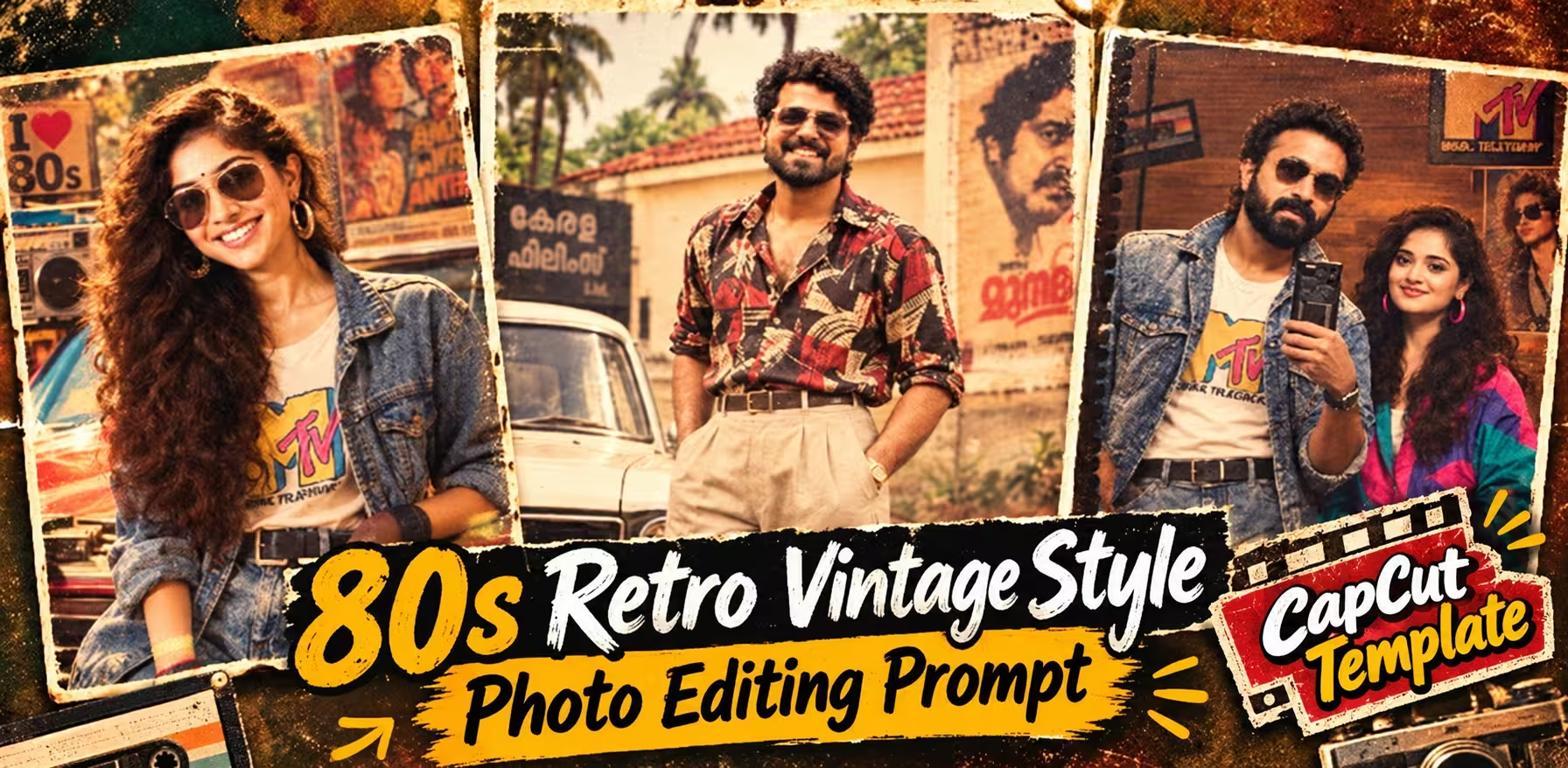
Viral 80s & 90s Retro AI Photo Editing & CapCut Template
Want to turn your ordinary selfie into a stylish 1980s or 1990s retro photograph? The old-school fashion, vintage cars, faded film colors, classic Bollywood vibes, and nostalgic camera effects are perfect for creating eye-catching Instagram Reels and social media posts.
With the right AI photo editing prompt, you can recreate the charm of an old Indian street photograph, a classic 90s Bollywood-inspired portrait, or a romantic vintage couple picture while keeping your natural facial identity recognizable.
In this guide, you will find the best 80s and 90s retro vintage AI photo editing prompts for 2026, including prompts for boys, girls, couples, vintage cars, and cinematic portraits. You will also learn how to create these images using an AI image generator and turn your finished photos into a retro-style video using the CapCut template section near the end of this article.
You don’t need professional photography skills. Just choose a clear photo, copy your favorite prompt, and follow the steps below.
Table of Contents
- What Is 80s & 90s Retro Vintage AI Photo Editing?
- Why Are 80s and 90s Retro Photos Trending?
- How to Create an 80s & 90s AI Retro Photo
- Best 80s & 90s Retro Vintage AI Photo Editing Prompts 2026
- How to Get the Best Results from Retro AI Prompts
- How to Make an 80s & 90s Retro Video
- CapCut 80s & 90s Retro Template 2026
- How to Use the CapCut Retro Template
- Best Export Settings for Retro Reels
- Common Retro AI Photo Editing Problems and Fixes
- Frequently Asked Questions
- 1. How can I create an 80s retro AI photo for free?
- 2. Which photo is best for 80s and 90s AI editing?
- 3. Can I use these prompts for both boys and girls?
- 4. Can I create a 90s couple photo with AI?
- 5. Can I use these prompts in ChatGPT or Google Gemini?
- 6. How do I make a retro video in CapCut?
- 7. What is the best ratio for retro AI photographs?
- 8. Can I use these images for Instagram Reels and YouTube Shorts?
- Conclusion
What Is 80s & 90s Retro Vintage AI Photo Editing?
80s and 90s retro vintage AI photo editing is a creative technique that transforms modern photographs into images inspired by the photography, fashion, and cinematic aesthetics of the 1980s and 1990s.
Instead of applying only a simple vintage filter, an AI image generator can help recreate the entire atmosphere of that period. You can experiment with retro hairstyles, printed shirts, denim jackets, classic cars, old Indian streets, vintage shops, and warm analog film colors.
The most recognizable elements of this style include:
- Vintage fashion: Denim jackets, printed shirts, high-waisted jeans, and classic accessories.
- Old film colors: Warm golden tones, faded blacks, muted colors, and soft contrast.
- Analog photography: Natural film grain, subtle dust, light leaks, and gentle vignetting.
- Classic backgrounds: Old Indian streets, college campuses, vintage cars, and traditional storefronts.
- Cinematic composition: Natural poses, realistic shadows, shallow depth of field, and nostalgic lighting.
The goal is to make your photograph look as though it was captured with an old film camera rather than simply edited with a modern filter.
Why Are 80s and 90s Retro Photos Trending?
Retro photography has a timeless appeal. Even though smartphone cameras can capture highly detailed photographs today, many people love the warmth and character of older photographs.
The 80s and 90s aesthetic is particularly useful for social media creators who want something different from ordinary selfies and highly polished AI portraits.
Here are a few reasons to experiment with this style:
1. Nostalgic Bollywood-inspired looks
Classic hairstyles, denim outfits, vintage cars, and cinematic poses can create the atmosphere of an old Bollywood photograph.
2. Unique Instagram Reels
You can turn a collection of retro portraits into a short transformation video using music, transitions, and beat-sync effects.
3. Creative couple photography
AI editing can help you create a coordinated vintage-style couple portrait using separate reference photographs, provided your image tool supports multiple reference images.
4. Different looks from one photograph
You can try several styles, including an old college photograph, a retro street portrait, a vintage car photoshoot, or a faded film-camera effect.
Remember that trends change over time, so results and popularity can vary across platforms. Focus on creating a style you genuinely enjoy rather than relying only on a trend.
Best 80s & 90s Retro Vintage AI Photo Editing Prompts 2026
Creating a retro portrait is straightforward. You need a suitable photograph and an AI image generator that supports image uploads and prompt-based editing.
Follow these steps:
Step 1: Choose your photograph
Select a clear selfie or portrait with good lighting. A photograph showing your face clearly will usually provide a better starting point.
Step 2: Open an AI image generator
Use an image-generation tool that supports uploading an existing photograph and editing it through text instructions.
Step 3: Upload your photo
Select your photograph using the upload or plus icon. If you are making a couple’s image, use a tool that supports multiple reference photographs.
Step 4: Copy a retro prompt
Choose one of the prompts below according to your preferred style. Copy the complete prompt and paste it into the image generator.
Step 5: Generate your image
Submit the prompt and review the result. If the face, pose, outfit, or background is incorrect, refine the prompt and try again.
Step 6: Save your final photograph
Download the result in the highest available quality. You can then use it for Instagram posts, thumbnails, profile pictures, or video edits.
Tip: Always check the generated image before posting. AI tools may occasionally change facial details, clothing, or hands despite detailed instructions.
1. Classic 1980s Indian Street Portrait
This prompt is ideal for anyone who wants a vintage Indian street photograph with retro clothing, warm sunlight, and an old-school cinematic atmosphere.
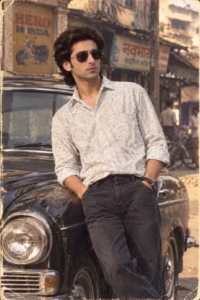
Transform my uploaded photograph into a believable 1980s-inspired portrait while keeping my original identity completely recognizable. Preserve my facial structure, eyes, eyebrows, nose, lips, jawline, complexion, hairstyle, natural skin details, age and body proportions without beautifying or reshaping my face. Style me with authentic 1980s fashion, a voluminous vintage hairstyle, classic accessories and aviator sunglasses. Place me in a realistic period setting containing details such as a vintage automobile, old storefronts, retro posters and a cassette player. Use warm golden illumination, soft contrast, faded vintage colors, realistic depth of field and natural shadows. Add delicate analog film grain, subtle photographic wear, dust and lightly aged edges. Make everything appear naturally photographed on an old film camera, with realistic textures and no digital-looking effects, text or watermark.
2. 1990s Bollywood Hero Vintage Look
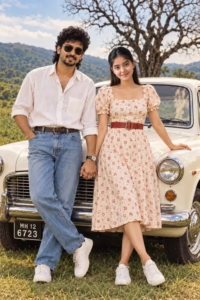
Ultra HD 8K photorealistic retro 80s couple front pose looking directly at camera smiling — woman front facing beautiful smile teeth visible red lipstick black cat-eye sunglasses off-white midi dress red small floral print puff short sleeves square neck red leather belt waist red bandana headscarf on hair bun white sneakers left hand on white vintage car right hand holding man’s hand legs crossed — man front facing curly mullet hair mustache black sunglasses.4:5
3. Retro Vintage Car Photography
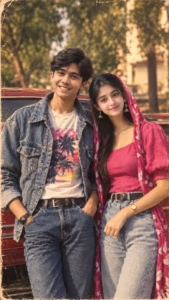
Create a highly realistic vertical 9:16 photograph featuring the two people from my uploaded reference images. Preserve both identities exactly, including their facial structure, skin tone, hairstyle, age, natural features and body proportions. Place the man on the left and woman on the right in a relaxed romantic pose beside a classic vintage car. Give them authentic 1990s-inspired Indian fashion with realistic clothing, accessories and natural styling. Set the scene on an old Indian street with greenery, vintage surroundings and soft golden sunlight. Use shallow depth of field, cinematic framing, faded warm colors, subtle analog grain, gentle film scratches and natural shadows. The final picture should resemble a genuine 1990s film photograph, with realistic skin, anatomy, hands, clothing texture and no text, watermark or artificial beauty filter
4. Golden-Hour-Retro-Diner-Cafe
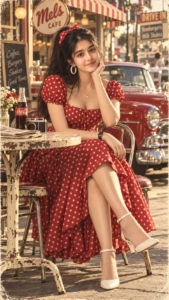
Create a photorealistic vintage 1950s–60s-inspired cinematic portrait of the woman from the uploaded reference image. Preserve her exact facial identity, facial structure, natural skin tone, hairstyle characteristics, and realistic facial details.
IMPORTANT: Keep the woman’s FACE DIRECTION, HEAD ANGLE, EYE DIRECTION, and GAZE EXACTLY AS SHOWN IN THE UPLOADED REFERENCE IMAGE. She is looking FRONT/TOWARD THE CAMERA, so do not turn her face to the side or change her eye direction. Her face must remain naturally front-facing toward the camera, with the same overall facial orientation as the reference. Do not alter the gaze direction.
Dress her in a beautiful vintage red dress with white polka dots, a fitted square-neck bodice, short puff sleeves, and a flowing full skirt. Style her dark hair in a high ponytail with a red-and-white polka-dot bow, with a few soft strands naturally framing her face. Add large white hoop earrings, a delicate silver necklace with a small pendant, and a classic black wristwatch.
Place her sitting gracefully at an outdoor retro café, with one hand gently supporting her cheek/chin and the other arm resting naturally across her lap. Her legs are elegantly crossed, and she wears elegant white ankle-strap heels.
Create a nostalgic 1950s–60s American diner atmosphere around her: a vintage red classic car parked behind her, an old-fashioned café storefront, striped awning, warm glowing lights, retro signage, and softly blurred street details. In the foreground, place a small distressed vintage café table with a classic vintage camera, folded newspapers, a glass Coca-Cola bottle, and a small vase of flowers.
Use warm golden-hour sunlight, cinematic lighting, realistic shadows, shallow depth of field, subtle background bokeh, authentic vintage film grain, slightly faded retro color grading, natural skin texture, realistic hair strands, detailed fabric texture, and professional editorial photography.
The final image should look like an authentic vintage photograph captured with a high-end camera, while maintaining the woman’s exact recognizable facial appearance and, most importantly, the EXACT FRONT-FACING FACE AND EYE DIRECTION from the uploaded reference image.
Photorealistic, ultra-detailed, natural proportions, cinematic composition, nostalgic 1950s–60s aesthetic, vertical 9:16 portrait, no face distortion, no change in gaze direction, no side profile.
5. 1980s College Fashion Portrait
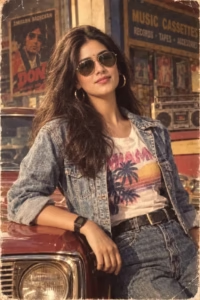
Turn my uploaded photo into a photorealistic Indian fashion collage while using my image as the primary identity reference. Keep my facial identity, face shape, eyes, nose, lips, skin tone, hairstyle, natural texture, age and body proportions unchanged. Create a stylish multi-frame composition featuring me in an elegant traditional Indian saree with graceful poses and realistic fabric details. Each section should feel like part of the same professional fashion photoshoot while showing slightly different poses and framing. Use rich but natural colors, soft studio lighting, realistic shadows, detailed skin texture and a premium editorial photography look. Maintain accurate anatomy, natural hands and believable clothing folds. Make the final collage polished, realistic and visually attractive, without artificial beauty effects, distorted features, text or watermark.
How to Get the Best Results from Retro AI Prompts
A detailed prompt helps, but your reference photograph also matters. Use the following tips to improve the final result.
Use a clear reference image. Choose a photo where your face is visible, well-lit, and not heavily covered by sunglasses, filters, or shadows.
Describe the decade clearly. The 1980s and 1990s had different fashion and photographic styles. Mention the exact decade in your prompt instead of simply writing “vintage.”
Keep identity instructions specific. Ask the AI to preserve your recognizable face and natural features. Identity preservation is an instruction, not a guarantee, so inspect the output carefully.
Avoid too many conflicting details. If you want a simple portrait, don’t ask for a crowded street, multiple vehicles, several people, dramatic lighting, and complex poses all at once.
Choose the right aspect ratio. Use 4:5 for Instagram portrait posts, 9:16 for Reels and Stories, and 16:9 for YouTube thumbnails.
Generate variations when necessary. If the first image does not look right, adjust the pose, lighting, or background and try again.
How to Make an 80s & 90s Retro Video
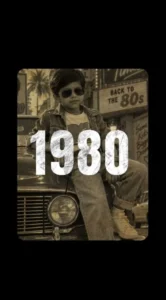
Once you have created your favorite retro AI photograph, you can turn it into a short video using a mobile video editor.
A retro transformation video can include:
- An original photograph followed by the AI-edited version.
- Quick transitions between 1980s and 1990s outfits.
- Beat-synchronized photo changes.
- Slow-motion effects and subtle zooms.
- Warm colors, film grain, and nostalgic music.
You can manually create this effect in a video editor or use a ready-made template if one is available for your device and region.
For the best result, prepare three to six photographs with a consistent retro aesthetic. Using pictures with similar colors and lighting can make the final edit feel more polished.
CapCut 80s & 90s Retro Template 2026
Want to turn your vintage photographs into a stylish retro Reel without editing every transition manually?
A suitable CapCut template can help you arrange your photos with preset timing, transitions, motion effects, and music synchronization. Look for an 80s or 90s retro-style template that matches the mood of your AI photographs.
Use the template section below to access your selected CapCut edit.
USE THE 80s & 90s RETRO CAPCUT TEMPLATE
Template link: Add your verified CapCut template URL here before publishing.
How to use it:
- Open the template link on a compatible device.
- If CapCut is supported in your region and the template is available, open it in the app.
- Select the required photographs or video clips.
- Preview the result and check the timing.
- Export your finished video using the available export settings.
Important: Template availability can change by region, account, device, and time. Only publish a working template link that you have tested yourself. Do not promise watermark-free exports unless you have verified that the specific template and export process support them.
How to Use the CapCut Retro Template
Follow these steps to create a retro video using a compatible CapCut template.
Step 1: Prepare your photos
Save your finished AI-generated 80s and 90s photographs in your phone’s gallery. Choose images that look good together.
Step 2: Open the template
Tap the verified template link provided in the template section. Follow the on-screen instructions to open the template in CapCut, if available.
Step 3: Select your media
Choose the number of photos or clips required by the template. Place your best portrait in the opening slot if the template allows you to control the order.
Step 4: Preview the video
Check the transitions, cropping, timing, and music synchronization. Make sure important facial details are not cropped out.
Step 5: Customize the edit
If the template supports customization, adjust the clip order, soundtrack, text, or effects. Keep the edit simple enough for the retro aesthetic to remain the main focus.
Step 6: Export your video
Select the available export resolution and frame rate. Preview the exported file before uploading it to Instagram Reels, YouTube Shorts, or another social platform.
If the template does not open, check whether it is still available, whether CapCut is supported in your region, and whether the link requires an updated version of the app.
Best Export Settings for Retro Reels
Use these settings as a starting point for social media videos.
| Setting | Recommended option |
|---|---|
| Aspect ratio | 9:16 vertical |
| Resolution | 1080 × 1920 |
| Frame rate | 30 FPS for most photo edits |
| Format | MP4, if available |
| Video quality | High quality |
| Music | Use platform-approved audio |
| Final check | Review cropping, text, and transitions |
For a YouTube thumbnail, create a separate 16:9 image rather than stretching your vertical Reel to fit the thumbnail.
Common Retro AI Photo Editing Problems and Fixes
Problem 1: The generated face looks different
Use a clearer reference photograph and repeat the identity-preservation instructions. If the tool supports image editing rather than generation from scratch, try editing the original image with a less complicated prompt.
Problem 2: The image looks too modern
Mention a specific year or decade, such as 1988 or 1994. Describe period-appropriate clothing, vehicles, backgrounds, and analog film characteristics.
Problem 3: The vintage effect is too strong
Reduce instructions for scratches, haze, and color fading. Ask for subtle film grain, natural skin tones, and realistic contrast.
Problem 4: Hands or clothing look distorted
Use a simpler pose and avoid placing hands over complex objects. Generate another variation if the anatomy is incorrect.
Problem 5: The CapCut template does not open
Confirm that the link is valid and that the template remains available. Check app compatibility and regional access. If it is unavailable, use another working template or recreate the transitions manually in a compatible video editor.
Frequently Asked Questions
1. How can I create an 80s retro AI photo for free?
You can try an AI image-generation tool that offers free image creation or editing. Free usage limits, supported features, and download quality vary by service.
2. Which photo is best for 80s and 90s AI editing?
A clear, well-lit portrait with a visible face is a good starting point. Choose a full-body photo when you want the AI to recreate your clothing and pose more accurately.
3. Can I use these prompts for both boys and girls?
Yes. You can adapt the clothing, hairstyle, accessories, and background descriptions to suit your preferred style. Always upload an appropriate reference photograph when identity preservation matters.
4. Can I create a 90s couple photo with AI?
Yes. Use an image generator that supports multiple reference images, and clearly specify which reference belongs to each person. Review the result to ensure both people remain recognizable.
5. Can I use these prompts in ChatGPT or Google Gemini?
You can try them in an image-generation or editing experience that supports reference-photo uploads. Available features and results depend on the tool and your account.
6. How do I make a retro video in CapCut?
Open a compatible retro template, select your photos, preview the transitions, and export the result. If a template is unavailable in your region, you can manually create a similar edit in a compatible video editor.
7. What is the best ratio for retro AI photographs?
A 4:5 portrait ratio works well for Instagram feed posts, 9:16 is suitable for Reels and Stories, and 16:9 works well for YouTube thumbnails and landscape images.
8. Can I use these images for Instagram Reels and YouTube Shorts?
Yes. You can use your generated images in videos, provided you have the necessary rights to the source material and comply with the platform’s policies. Use music that is licensed or otherwise permitted for your intended use.
Conclusion
The 80s and 90s retro vintage style is a creative way to give your photographs a nostalgic, cinematic appearance. With the right prompt, you can experiment with classic Indian street portraits, vintage cars, denim fashion, romantic couple photography, and old film-camera effects.
Start with a clear reference photograph, choose one of the ten prompts in this guide, and adjust the details until you get a result you like. Once your images are ready, use the CapCut template section to turn them into a short retro video.
Ready to create your own vintage look? Choose your favorite prompt, generate your photo, and make your next retro-inspired Reel your own.
Bookmark PromptByVishu.com for more AI photo editing prompts, trending video editing ideas, and creative tutorials.