All Types of Trending Photo Prompts (Copy Paste): Boy, Girl, Couple & More
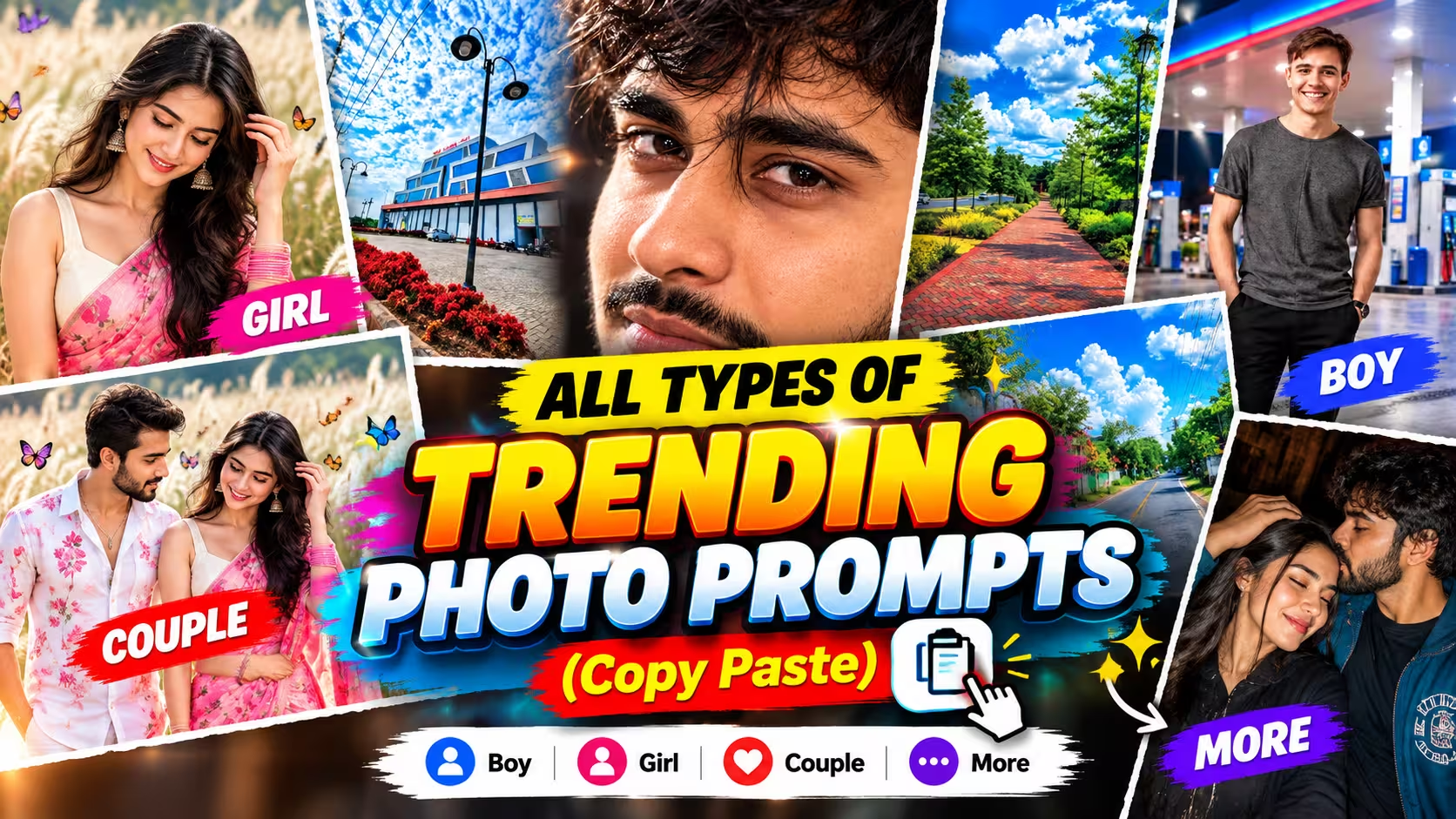
Open Facebook or Instagram and you’ll see it everywhere. A boy standing in golden light like a movie hero. A girl in a saree by the river at sunset. A couple on a beach that looks straight out of a wedding film. And you probably wondered, how are people making these?
I had the same question. When I first tried it myself, the results were honestly bad. The face looked strange, the background was messy, and nothing matched what I had in mind. The reason was simple. I didn’t know how to explain my idea to the AI.
Once I learned how to write a proper prompt, everything changed. In this post, I’m putting all types of trending photo prompts in one place. Copy one, upload your photo, and you’ll have a great image in a few seconds.
Table of Contents
- What Is a Photo Prompt?
- How Does Gemini AI Turn a Prompt Into a Photo?
- Why Everyone Is Searching for Trending Photo Prompts Right Now
- How to Use a Copy Paste Prompt, Step by Step
- Trending Photo Prompts for Boys
- Trending Photo Prompts for Girls
- Trending Photo Prompts for Couples
- Family and Kids Photo Prompts
- Creative and Viral Photo Prompts
- The Simple Prompt Formula: Subject + Style + Lighting + Background
- How to Write Your Own Prompt
- Common Mistakes to Avoid
- Common Problems and Easy Fixes
- Tips for Realistic, High Quality Results
- Conclusion
- Frequently Asked Questions
What Is a Photo Prompt?
A prompt is just the instruction you give to an AI tool. That’s all it is.
Think of a friend who is good at drawing. If you tell him “draw something,” he’ll draw whatever he likes. But if you say “draw a small house near a river, with mountains behind it and the sun setting,” you’ll get something much closer to your idea.
AI works the same way. Your words are the brief. The clearer the brief, the better the photo.
Not everyone has the time or the English to write a detailed prompt every time. That’s why copy paste prompts are so popular. Someone has already worked out the wording, and you just paste it, upload your photo and go.
I copied prompts for a long time before I started writing my own. It’s a good way to begin, because you also learn what a good prompt looks like.
How Does Gemini AI Turn a Prompt Into a Photo?
Gemini reads your text and looks at the photo you upload. Then it builds a new image that matches both.
The photo you upload tells it what your face looks like. The prompt tells it everything else: the outfit, the place, the light and the mood.
That’s why most good prompts start with a line like “keep the face exactly the same as the uploaded photo.” Without it, the AI may change your features a little, and the result stops looking like you.
The rest is about detail. If you say “a boy in a shirt,” you’ll get a generic boy in a shirt. If you say “a young man in a beige oversized shirt on an old street at golden hour,” you’ll get something you’d actually post.
Why Everyone Is Searching for Trending Photo Prompts Right Now
Because trends move fast, and nobody wants to be the last person to try them.
A new style goes viral on Monday, and by Wednesday half your friends have already posted it. Hiring a photographer for every trend isn’t realistic, and learning photo editing takes months. AI prompts give people a shortcut.
There’s another reason too. Everyone wants a profile picture that looks a bit different from everyone else’s. Ready-made prompts make that easy. You just change the outfit or the background, and the photo becomes your own.
How to Use a Copy Paste Prompt, Step by Step
It’s a very simple process. Here’s exactly how I do it.
- Open the Gemini app on your phone, or go to gemini.google.com on your computer.
- Tap the upload or plus icon and add a clear photo of yourself. Front-facing, good light, no heavy filters.
- Copy any prompt from this page and paste it into the message box.
- Read it once. Change the outfit, color or place if you want something different.
- Press send and wait a few seconds.
- If the result is close but not perfect, don’t start over. Just type what you want changed, like “make the lighting softer” or “keep my face exactly like the original.”
That’s really all there is to it. Now let’s get to the prompts.
Eyes Trending Prompt
- Scroll down and copy the AI photo editing prompt.
- Upload your own photo along with the reference image.
- Paste the copied prompt into the chat.
- Hit Enter and let the AI generate your image.
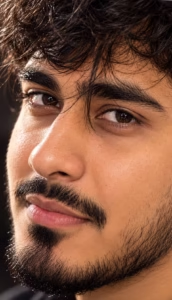
Ultra- realistic extreme close-up macro portrait of the same person, 3/4 side angle, focus on both eyes, a few soft hair strands naturally crossing the eyes, deep brown eyes with crystal-clear catchlights, detailed iris texture, subtle natural skin pores, flawless realistic skin, loose hair, cinematic studio lighting, 100mm DSLR macro lens, shallow depth of field, luxury beauty photography, hyper-realistic, 8K.
Golden Hour Street Portrait
- Download the reference image.
- Scroll down and copy the AI photo editing prompt.
- Click the Create Your Image button below, or open ChatGPT or Gemini.
- Upload your own photo along with the reference image.
- Paste the copied prompt into the chat.
- Hit Enter and let the AI generate your image.
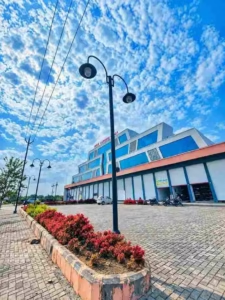
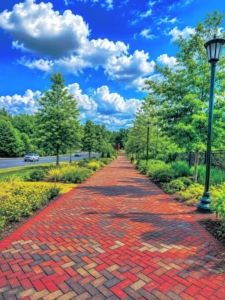
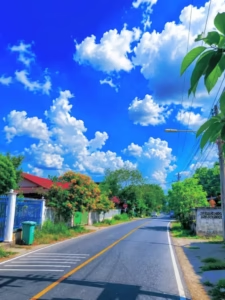
Place this person in the second photo in a realistic manner and adjust them to match the second photo; do not change anything else. Keep the background exactly as it is—do not alter it at all—and do not change the face or body size. Enhance the image to 8K quality and set the aspect ratio to 3:4.
Petrol Pump Photo Edit
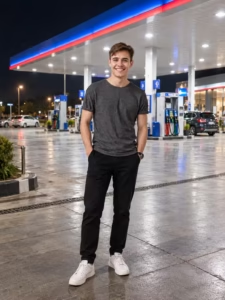
Use my uploaded photo as the main identity reference. Create a highly realistic full-body portrait of me standing naturally in front of a modern, brightly illuminated petrol station at night. Preserve my exact facial identity, face shape, eyes, nose, lips, skin tone, hairstyle, body proportions, and natural appearance. Place me slightly in the foreground with a relaxed, candid pose and natural expression. The petrol station should have a large contemporary canopy, bright white ceiling lights, blue and red accent lighting, visible fuel dispensers, clean tiled pavement, and subtle reflections on the ground. Add realistic night atmosphere with deep dark sky and soft environmental lighting. Maintain accurate perspective, natural shadows, realistic skin texture, detailed clothing, DSLR-quality photography, cinematic depth, sharp focus, and photorealistic details. No text, watermark, distortion, or artificial beauty effects.
1980s Retro Indian Photography
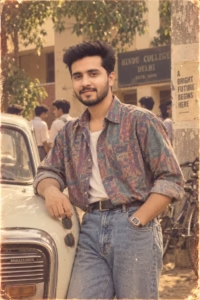
Using my uploaded photo as the identity source, recreate the exact same person as if they were photographed in India during the late 1980s.**Identity preservation (critical):**- Keep the face, skin tone, body shape, smile, expression, and overall likeness identical to my uploaded photo.- Do not alter, beautify, or replace any facial features—accuracy is paramount.**Styling (1980s Indian fashion):**- Dress the person in a stylish late-80s outfit: high-waisted jeans, a printed or oversized shirt (or denim jacket), retro accessories (chunky bracelets, shades, watch), and voluminous, textured hair with period-appropriate styling.**Setting & background:**- Place them in a realistic Indian setting—could be a college campus, residential street, or verandah with typical 80s architecture, plants, and vintage elements like an old Ambassador car, scooter, or cycle rickshaw in the backdrop.**Photographic aesthetic (authentic 1988 film look):**- Apply warm, slightly faded analog film colors with a soft amber-green tint.- Add natural grain, subtle soft focus, gentle light flares, and realistic depth of field.- Mimic the look of a physical 1988 photograph—slight color shifts, moderate contrast, and a nostalgic, lived-in warmth.The final image should feel like a genuine vintage Indian photograph from 1988, not a modern digital recreation. The person must remain unmistakably themselves, just transported to that era.
Retro 90s Film Look
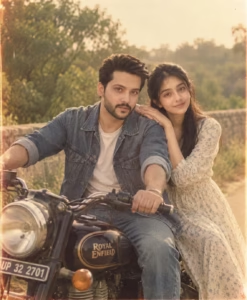
Using my uploaded photo as the sole source for facial identity, and the provided reference image as the template for composition, setting, styling, and photographic aesthetic, generate a new image that places the exact person/people from my photo into the scene and style of the reference.Critical instructions:Preserve the faces in my uploaded photo exactly as they are—do not alter, replace, or美化 facial features, expressions, or age.Recreate the reference image’s pose, framing, depth of field, and spatial arrangement of subjects and elements.Match the setting: natural Indian greenery, outdoor daylight, with a vintage Royal Enfield Bullet motorcycle prominently placed.Replicate the clothing style, period-appropriate hairstyles, and overall late-1980s Indian fashion aesthetic.Apply the lighting from the reference: warm, golden-hour or soft sunlight, with natural shadows and highlights.Emulate the photographic look: analog film grain, slightly faded colors, subtle color shifts (warm amber/greenish tint), moderate contrast, and a soft, nostalgic glow typical of late-1980s Indian photography.Ensure the final image feels like an authentic vintage photograph, not a digital or hyper-realistic modern reproduction—include subtle imperfections like slight softness, light leaks, or dust specks if present in the reference.Workflow tip: For best results, take a screenshot of the reference image and upload it alongside your personal photo. The reference defines the scene and style; your photo defines the identity. Do not swap or blend faces from the reference into the output.
Romantic Young Indian Couple
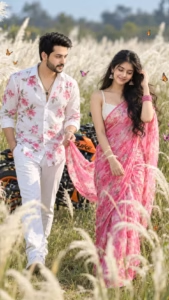
Create a cinematic 8K DSLR photograph in a portrait composition of a romantic young Indian couple walking through a beautiful field of tall white Kans grass. The young man wears a stylish white shirt with vibrant pink floral prints and white trousers, looking lovingly at the woman while gently holding the flowing end of her saree. The beautiful young woman wears a bright pink floral saree with an elegant white blouse, traditional jhumka,pink bangles,and long wavy black hair flowing naturally in the breeze. She smiles softly while gracefully touching her hair. An orange KTM Duke bike is parked behind them among the grass. Colorful butterflies flutter around the couple, while soft Kans grass creates a dreamy foreground and background. Bright natural daylight, cinematic lighting, realistic skin texture, detailed fabric, natural hair movement, shallow depth of field, foreground bokeh, vibrant natural colors, romantic storytelling, photorealistic and highly detailed.
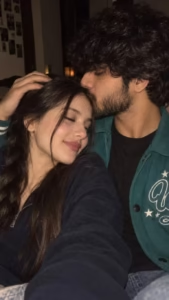
Photorealistic romantic close-up selfie of a young couple cuddling cheek-to-cheek in a dimly lit room. The handsome young man has thick, slightly messy black hair, a well-groomed full beard and light mustache, natural skin texture, and a soft affectionate expression while gently kissing the woman’s forehead. The woman has long, straight dark-brown hair falling naturally around her face, soft glowing skin, subtle makeup, closed eyes, glossy natural lips, and a peaceful romantic smile. She is resting comfortably against him while his hand gently rests on her head. Warm low-light flash photography, realistic skin texture, natural facial features, intimate candid feeling, soft shadows, subtle background blur, cinematic warm tones, authentic smartphone-camera look, no excessive retouching, no artificial AI appearance, vertical 9:16 composition.
The Simple Prompt Formula: Subject + Style + Lighting + Background
Every prompt above is built on the same four parts. Once you know them, you can write your own without any help.
| Part | What It Means | Example |
|---|---|---|
| Subject | Who is in the photo | A young man, a girl in a saree, a couple |
| Style | How the photo should feel | Cinematic, retro, dreamy, editorial |
| Lighting | What kind of light is used | Golden hour, neon night, soft window light |
| Background | Where the scene takes place | Old street, beach, snowy hills, cafe |
If even one of these is missing, the AI has to guess. And when it guesses, the result usually isn’t what you wanted. Get these four right and your photo will almost always turn out well.
How to Write Your Own Prompt
Copying is a great start, but sooner or later you’ll want to make something that’s your own idea. Don’t worry, it’s easier than it looks.
Start small. Decide who is in the photo. Then write what they’re wearing. Then write where they are. Then add the light and the mood. That’s it.
For example: “A young man in a green kurta, standing on a rooftop at sunset, warm light, calm mood.” It’s short, but the AI already understands the picture.
Your first try may not be perfect, and that’s normal. Change one thing at a time and try again. After a few attempts, you’ll start to feel what works.
Common Mistakes to Avoid
Writing very long, messy paragraphs. Keep your sentences short. One idea at a time works better than ten ideas crammed together.
Forgetting to edit the copied prompt. If the prompt says “red saree” and you want blue, change it. Read the prompt once before you send it.
Asking for too many things at once. One outfit, one place, one mood. When you ask for too much, the AI gets confused and the photo suffers.
Uploading a bad photo. A blurry, dark or heavily filtered photo gives the AI very little to work with. Use a clear one.
Spelling mistakes. A wrong word can completely change the result. Give it a quick check before you press send.
Common Problems and Easy Fixes
The face doesn’t look like you. Add the line “keep the face exactly the same as the uploaded photo” and try again with a sharper, front-facing photo.
Extra or bent fingers. This is a well-known AI problem. Add “natural hands with five fingers,” or pick a pose where the hands are less visible.
The skin looks too smooth or fake. Add “natural skin texture” and “realistic” to your prompt.
The outfit or color is wrong. Be more specific. “Dark green cotton kurta” works much better than “nice dress.”
The AI ignores part of your prompt. Your prompt is probably too long. Cut it down to the important parts and send it again.
Tips for Realistic, High Quality Results
- Always mention the light. “Soft morning light” and “warm sunset glow” completely change the mood of a photo.
- Name your colors clearly. “Red shirt” and “blue sky” are much better than “colorful.”
- Add the aspect ratio you need. Use 9:16 for Reels and Stories, and 4:5 for regular posts.
- End with “no watermark, no text” to keep the image clean.
- If the result is nearly right, ask for a small fix instead of rewriting everything.
- Save the prompts that work well for you. You’ll end up reusing them again and again.
Conclusion
You don’t need to be a designer, and you don’t need perfect English, to make great AI photos. All you need is a clear idea and a prompt that explains it properly.
Start with the ready-made prompts on this page. Once you’re comfortable, begin changing the outfits, places and lighting until the photos feel like yours. That’s when it really gets fun.
I’ll keep adding new trending prompts to this page, so save it and come back whenever you need fresh ideas.
Frequently Asked Questions
How do I write a good prompt for Gemini AI?
Keep it short and clear. Mention who is in the photo, the style, the lighting and the background. Add a line to keep the face unchanged.
How do I use a family photo in a Gemini prompt?
Upload the family photo first, then paste your prompt. Add a line saying all faces should stay exactly the same as the uploaded photo.
Can I get romantic couple photos with Gemini AI?
Yes. Upload one clear photo of each person, paste a couple prompt from this page, and mention that both photos are the face references.
Are these prompts free to use?
Yes, you can copy and use them as many times as you like. Your Gemini plan may limit how many images you can generate in a day.
Why doesn’t the result look like me?
Usually the uploaded photo is unclear, or the prompt doesn’t say to keep the face unchanged. Use a sharp, front-facing photo and add that line.
Can I change the outfit or the background?
Yes, that’s the best part. Swap the outfit, color or location in the prompt and the AI will follow.
What makes a good prompt?
Clear words, correct spelling, and all four parts: subject, style, lighting and background.
1 thought on “Trending Photo Prompts Copy Paste”