Ganesh Chaturthi AI Photo Prompts 2026
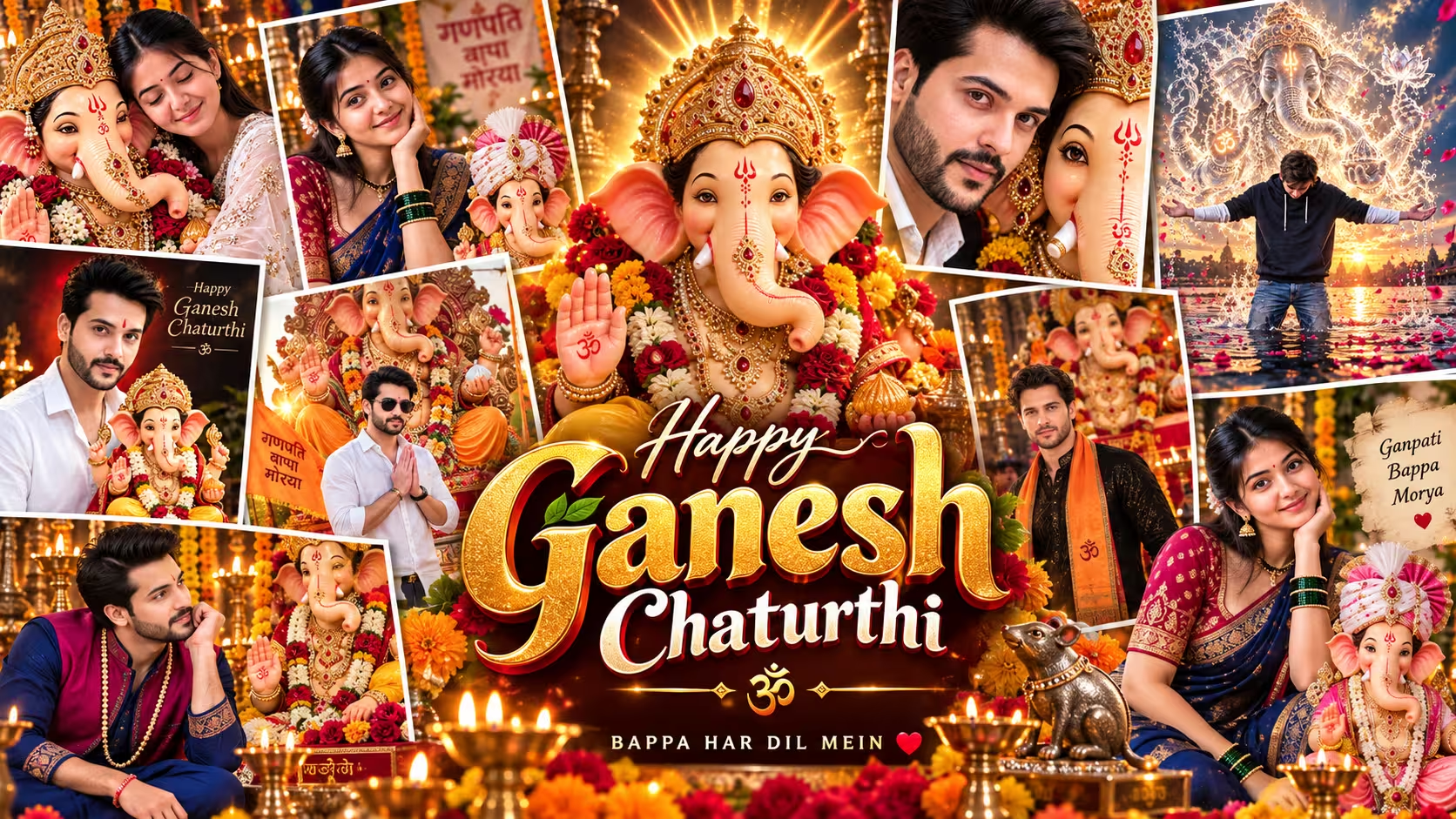
Ganesh Chaturthi is one of the most beautiful and popular festivals in India. On this festival, people bring Lord Ganesha idol to their homes and pandals and celebrate the occasion with full happiness and devotion. In recent time, Ganesh Chaturthi AI photo editing has also become very popular on Instagram, Facebook and WhatsApp.
Many people see beautiful photos of boys and girls with Lord Ganesha and think how these photos are made. Actually, you can create these type of photos very easily with the help of ChatGPT or Gemini AI. You only need a good photo of yourself and the right AI prompt.
I also tried different prompts for making Ganesh Chaturthi photos and found that the prompt is very important. If the prompt explains the face, dress, Ganesha idol, background, lighting and camera style properly, the result becomes much better.
In this article, I am sharing 10+ best Ganesh Chaturthi prompts for ChatGPT and Gemini AI. You can simply copy the prompt, upload your photo and try it. I have included prompts for boys, girls, devotional photos, traditional photos, Ganesha idol photos and some unique cinematic ideas also.
Table of Contents
- What is Ganesh Chaturthi AI Photo Editing?
- Why Ganesh Chaturthi AI Photos Are Trending
- How to Create Ganesh Chaturthi AI Photo Using ChatGPT and Gemini
- 10+ Best Ganesh Chaturthi Prompts for ChatGPT and Gemini
- Ganesh Chaturthi Prompts for Boys
- Ganesh Chaturthi Prompts for Girls
- How to Keep Your Face Same in AI Photo
- Common Problems While Creating Ganesh Chaturthi AI Photos
- Tips to Make Your Ganesh Chaturthi Photo More Realistic
- How to Write Your Own Ganesh Chaturthi AI Prompt
- Mistakes to Skip
- Conclusion
- Frequently Asked Questions (FAQs)
What is Ganesh Chaturthi AI Photo Editing?
Ganesh Chaturthi AI photo editing means creating a new festive photo using your existing photo and an AI image tool. You upload your normal picture and give instructions about how you want the final photo to look.
For example, you can ask AI to show you standing beside Lord Ganesha, sitting near a beautiful Ganesh idol, holding Ganesha idol or praying with folded hands. You can also add traditional clothes, flowers, diyas, marigold decorations and a beautiful Ganesh Chaturthi pandal background.
The most important thing is your prompt. A prompt is simply the instruction which you give to AI. If your words are clear, AI can understand the scene much better.
I also noticed one thing while making these images. Just writing “make Ganesh Chaturthi photo” is not enough. You have to explain what the person is wearing, where Ganesha is placed, what kind of light you want and how realistic the photo should look.
Why Ganesh Chaturthi AI Photos Are Trending
Nowadays people like to put new and different photos on social media during every festival. Ganesh Chaturthi is also becoming a big trend for AI photo editing.
People are making devotional portraits with Lord Ganesha and sharing them on Instagram, Facebook, WhatsApp status and other social media. Some photos look like professional DSLR photos, while some have a cinematic festival look.
The best part is that you do not need advanced Photoshop knowledge for this. If you have a clear photo and a good prompt, the AI can do most of the work.
This is why people are searching for Ganesh Chaturthi AI Photo Prompt, Ganesh Chaturthi ChatGPT Prompt, Gemini Ganesh Chaturthi Prompt and Ganpati Bappa Photo Editing Prompt.
How to Create Ganesh Chaturthi AI Photo Using ChatGPT and Gemini
Making these photos is very simple. I will tell you the same basic method which you can follow from your phone.
- First open ChatGPT or Gemini AI on your phone or computer.
- Select the option for creating or editing an image.
- Upload your clear face photo.
- Choose one of the prompts given below.
- Copy the complete prompt and p aste it into the AI chat.
- If the prompt says uploaded person or uploaded man/woman, keep it like that.
- Send the prompt and wait for the image to generate.
- If the face is not matching properly, try again with a better reference photo.
- After the image is created, you can save it and share it on social media.
You do not need to change too many things. Just use a clear photo and follow the prompt properly.
10+ Best Ganesh Chaturthi Prompts for ChatGPT and Gemini
Below I have collected some different types of Ganesh Chaturthi AI prompts. Some are made for boys and some are suitable for girls. There are also some creative prompts where the photo looks more cinematic and different.
1. Premium Ganesh Chaturthi Portrait Prompt
This prompt is good if you want a very realistic professional photography type image. It focuses strongly on keeping the original face and making the Ganesha idol look like a real physical idol.
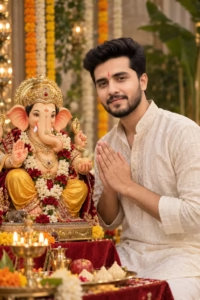
Use the uploaded person image as the STRICT identity reference.
Preserve the exact real face, facial structure, face shape, eyes, eyebrows, nose, lips, cheeks, jawline, skin tone, hairstyle, facial hair, natural asymmetry and original age. Do NOT beautify, reshape, smooth, stylize or create an AI-looking face.
The person must remain instantly recognizable as the exact same real individual from the uploaded reference. Maintain realistic human skin with visible natural pores, subtle texture and believable imperfections.
The Lord Ganesha idol must look like a premium professionally crafted physical idol, not a cartoon, illustration, CGI character or plastic toy.
Use extremely detailed fabric, jewellery, embroidery, pearls, gold ornaments, flower textures and realistic material reflections.
Photography quality should match a premium professional full-frame camera portrait: 85mm portrait lens look, natural facial proportions, accurate perspective, shallow cinematic depth of field, sharp subject focus, soft background separation, realistic exposure, controlled highlights, natural shadows, subtle filmic contrast and high dynamic range.
Lighting must feel professionally photographed, not digitally generated: soft directional key light, gentle fill light, subtle rim light, natural falloff across the face, realistic shadows beneath the chin, hands and clothing.
No excessive HDR. No oversaturated colors. No waxy skin. No plastic textures. No artificial face. No distorted hands. No extra fingers. No malformed idol details. No random text. No unrealistic glow. No fantasy CGI appearance.
Final result should feel like a real premium Ganesh Chaturthi photoshoot captured by a professional photographer.
Ultra-photorealistic, cinematic, highly detailed, premium editorial photography, natural human realism.
2. Ganesh Chaturthi Prompt for Girl in Maharashtrian Saree
If you want a traditional Marathi or Maharashtrian look, this prompt is very good. The red blouse, navy saree, traditional jewellery and Ganesha idol give the photo a proper festive feeling.
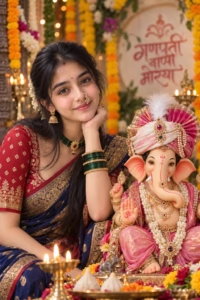
A high-resolution, ultra-realistic portrait of a smiling young Indian woman wearing traditional Maharashtrian attire alongside a beautifully decorated idol of Lord Ganesha. Use the uploaded woman’s image as a STRICT identity reference. Preserve her exact real face and recognizable identity.
SUBJECT — WOMAN:
A young Maharashtrian woman with dark hair tied in a neat traditional hairstyle with traditional hair ornaments. She is wearing a traditional red embroidered blouse and a deep blue/navy silk Nauvari saree with rich gold zari work.
Decorate her with traditional jewellery including a green bead choker necklace, gold jhumkas, a traditional Maharashtrian nath nose ring, dark green and gold glass bangles, a bindi and red sindoor on her forehead.
She is posing cheerfully with one hand resting gently under her chin/cheek.
IDOL — LORD GANESHA:
In the foreground, show a beautifully sculpted idol of Lord Ganesha seated gracefully, draped in a light pink silk dhoti and dupatta. The idol wears an elaborate pink-and-white royal turban/pheta adorned with a feather, pearls and jewels, with a slight warm smile.
SETTING & LIGHTING:
Soft, vibrant festive lighting, colorful Ganesh Chaturthi background with marigold garlands and traditional decorations, blurred shallow depth of field and beautiful bokeh.
Keep the woman and Ganesha idol sharply focused.
Vibrant colors, warm cheerful festive mood, highly detailed textures, realistic skin, premium cinematic photography, photorealistic, 8K.
3. Ganesh Chaturthi Boy With Huge Ganesha Idol
This one is made for boys who want a powerful festival poster type photo. The dark mandap and golden lighting give it a more dramatic look.
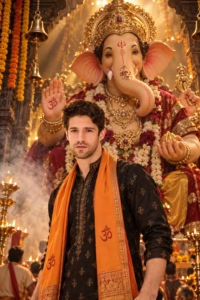
Create an ultra-premium dramatic Ganesh Chaturthi portrait using the uploaded man as the strict identity reference. Show him standing confidently in the foreground, slightly turned to one side, while a huge majestic Lord Ganesha idol rises behind him.
Dress him in a black kurta with subtle gold embroidery and a saffron stole.
The Ganesha idol should have a massive golden crown, deep red drapery, heavy traditional jewellery and a powerful divine presence.
Background: dark festival mandap with smoke, golden beams of light, hanging bells and flower garlands.
Camera: dramatic low-angle hero shot.
Lighting: strong golden rim light with deep cinematic shadows.
Photorealistic, highly detailed, realistic skin texture, natural face, realistic hands, premium festival photography, cinematic composition, 8K quality.
4. Boy Sitting Beside Lord Ganesha Prompt
This is a very detailed devotional prompt. The main focus is the young man looking at Lord Ganesha with a peaceful smile.
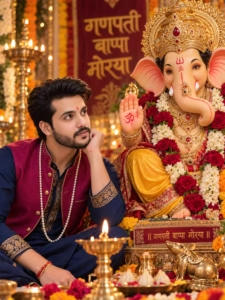
Create an ultra-photorealistic portrait of a young Indian man in his early 20s with stylish black hair, light beard, small pearl earring in the left ear and a small red tilak on the forehead.
Use the uploaded man’s image as the strict identity reference and keep 100% of his recognizable facial identity, natural facial structure, skin tone, age appearance and natural asymmetry.
He is wearing a navy blue kurta with gold embroidery on the collar and cuffs, a sleeveless magenta Nehru vest with gold buttons and piping, a long white pearl mala necklace and a red and gold kalava bracelet.
He is sitting on the floor with his left hand supporting his chin, looking affectionately up at Lord Ganesha with a soft gentle smile.
Beside him is a large ornate Lord Ganesha idol with realistic craftsmanship, light pink inner ears, trunk curved to the left with a white tip and red decorative line, heavy golden mukut crown with red gemstones, Om symbol and red tilak on forehead, heavy gold jewellery and necklaces, yellow dhoti, red velvet cloth and thick garlands of red roses and white jasmine flowers.
Background should be a beautiful festive Ganesh Chaturthi pandal with warm golden fairy-light bokeh, marigold flowers and devotional decorations.
Add a small golden brass diya burning in the foreground, a small golden Mushak mouse statue, a plate of modak sweets and flower petals.
Warm cinematic golden lighting, shallow depth of field, realistic skin texture, vibrant but natural colors, devotional mood, professional DSLR photography, 85mm lens look, 8K, portrait composition, 3:4.
5. Boy Namaste With Giant Ganpati Bappa
If you want a simple but powerful devotional photo, try this prompt. The folded hands pose makes it suitable for Ganpati Bappa status and social media profile photos.
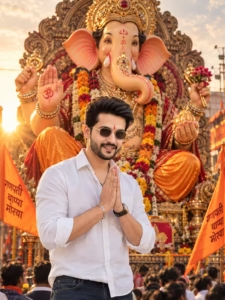
Create a photorealistic portrait of the uploaded young Indian man standing in the center foreground in front of a giant majestic Lord Ganesha idol.
Preserve the exact same face, identity, facial structure, skin tone, hairstyle, facial hair and natural age appearance from the uploaded reference photo.
The man has stylish black hair and a light beard, small rectangular gold-rimmed black sunglasses and a small red tilak on his forehead. He has a joyful big smile showing teeth.
He is wearing a crisp white long-sleeve button-up shirt with sleeves rolled up to the elbows, a silver chain bracelet on his right wrist and dark blue jeans.
His hands are joined together in a respectful namaste pranam pose.
Behind him is a huge ornate seated Lord Ganesha idol with a golden mukut crown decorated with red gemstones, big ears and a beautifully decorated trunk. One hand is raised in Abhaya Mudra with an Om symbol on the palm.
The idol is wearing golden jewellery, an orange dhoti and marigold flower garlands. Add an elaborate golden carved throne behind the idol and two saffron orange flags softly blurred on both sides.
Create a beautiful Ganesh Chaturthi festival atmosphere with warm golden-hour sunlight, soft sun flare, natural bokeh and a slightly blurred crowd at the bottom.
Ultra-realistic skin texture, natural hands, cinematic lighting, DSLR photography, 85mm lens, shallow depth of field, 8K, 3:4 portrait.
6. Bal Ganesha Sitting on Shoulder Prompt
This is a little different from normal Ganesh Chaturthi photos. If you want a cute and playful image, this one can be tried.
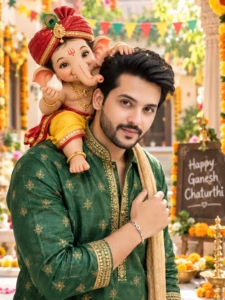
Create a playful yet photorealistic Ganesh Chaturthi portrait using the uploaded man as the strict identity reference.
Keep his exact face, facial structure, skin tone, hairstyle, facial hair, natural age and recognizable identity unchanged.
Show the man smiling naturally toward the camera while carrying a small adorable Bal Ganesha figure sitting playfully on one shoulder.
Dress him in a festive green kurta with elegant gold accents.
Bal Ganesha should look childlike, cheerful and beautifully crafted, wearing a tiny red turban, yellow dhoti and small traditional gold jewellery while holding a modak in his hand.
Background: bright decorated courtyard with flowers, colorful bunting, marigold decorations and soft natural sunlight.
Camera: medium close-up, slightly candid angle.
Mood: playful, affectionate, happy and festive.
Photorealistic human skin, realistic fabric and jewellery, natural lighting, detailed idol craftsmanship, cinematic photography, high resolution.
7. Man Holding Lord Ganesha Idol Studio Prompt
Sometimes a simple studio background gives a very premium result. This prompt is good if you do not want a crowded festival background.
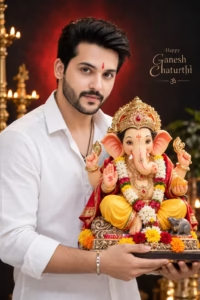
Create a high-quality photorealistic studio portrait of a young Indian man holding a colorful Lord Ganesha idol during Ganesh Chaturthi celebration.
Use the uploaded man’s image as the strict identity reference. The man must remain the exact same person as the uploaded reference image.
Preserve his exact face, facial structure, skin tone, hairstyle, facial hair and age appearance. Do not beautify or change his facial identity.
He is wearing a clean white shirt and standing against a dramatic dark studio background with a soft red light glow behind him.
Give him a natural gentle smile and a small red tilak on his forehead, expressing devotion, peace and joy.
He is carefully holding a beautifully decorated Lord Ganesha idol in front of him. The idol should have rich traditional colors, intricate detailing, traditional ornaments and premium festive decoration.
Professional studio lighting, cinematic contrast, realistic skin texture, natural shadows, sharp details, realistic hands, premium photography, photorealistic result, high resolution, 8K.
8. Ganesha Made From Water – Unique AI Prompt
This is one of the most creative prompts in the list. Instead of a normal idol, Lord Ganesha is created from water and liquid light. It can give a very different Instagram type image.
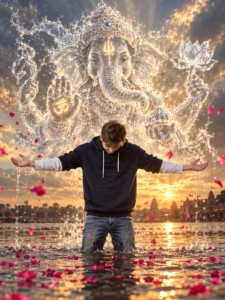
Create a cinematic photorealistic photo of the uploaded young man standing knee-deep in the middle of a river at golden hour sunset.
Preserve his exact real face and identity from the uploaded reference image. Keep his natural facial features, hairstyle, facial hair, skin tone and original age appearance unchanged.
He is wearing a dark navy hoodie over a white long-sleeve shirt and blue jeans. His head is slightly tilted down, arms stretched wide open to both sides in a complete surrender and devotion pose. Water is dripping naturally from his palms.
Add pink rose petals floating on the river surface and softly moving through the air.
Behind him, create a colossal ethereal divine figure of Lord Ganesha formed entirely from translucent splashing water and liquid light frozen in mid-air.
The water sculpture should clearly form Ganesha’s face, trunk, jeweled crown mukut and four arms. One hand holds a water lotus flower and another hand is raised in Abhaya Mudra with a glowing Om symbol.
Add a glowing white Trishul tilak on the forehead, realistic water droplets and spray, golden rim light and dramatic clouds with the setting sun on the horizon.
The sunset should reflect naturally on the river water with volumetric god rays and a magical spiritual atmosphere.
Ultra-realistic skin and water texture, frozen motion splash art, sharp focus, cinematic photography, 35mm DSLR lens look, 8K, 3:4 portrait.
9. Ganesha and Boy Extreme Close-Up Selfie
This prompt is for people who like close-up portraits. Here the face and Ganesha idol both fill most of the frame.
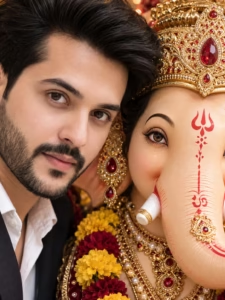
Create an extreme close-up photorealistic devotional portrait using the uploaded man’s photo as the strict identity reference.
Preserve his exact face, facial structure, skin tone, hairstyle, eyebrows, eyes, nose, lips, beard and natural facial asymmetry. The person must remain instantly recognizable as the same real individual.
Show the left-side half face of a young Indian man with thick dark voluminous hair, thick eyebrows, light stubble beard and goatee, wearing a white collared shirt and black blazer.
Place a large ornate Lord Ganesha idol very close beside him on the right side, creating an intimate devotional composition where both faces fill the frame.
The Ganesha idol should have realistic craftsmanship, detailed eyes, red Trishul tilak, decorated trunk with a white tip and red stripe, golden ring ornament, elaborate golden mukut crown with red gemstones, heavy golden earrings, layered golden necklaces with pearls and red stones and a marigold flower garland.
Warm temple festival lighting, soft natural light, shallow depth of field, 85mm lens f/1.8 look, realistic skin texture, cinematic composition, ultra-detailed, hyperrealistic, 8K, Ganesh Chaturthi atmosphere, 3:4 portrait.
10. Ganesh Chaturthi Girl With Modak and Ganesha
Girls can also create a traditional devotional photo using this prompt. The saree, jewellery, diyas and modak make the complete festival scene.
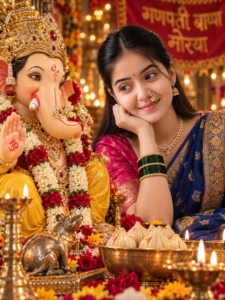
Create a hyper-realistic cinematic portrait of the uploaded young Indian woman gazing lovingly at a beautifully decorated Lord Ganesha idol during Ganesh Chaturthi.
Use the uploaded woman’s photo as the strict identity reference. Preserve her exact real face, facial structure, skin tone, hairstyle, age appearance and natural facial features. Do not change or beautify the face.
The woman is seated on the right side, resting her chin delicately on her hand.
She is wearing a traditional deep blue saree with a golden border and a bright pink blouse. Add traditional jewellery including a Maharashtrian nath nose ring, pearl necklace, earrings, red bindi and green bangles.
On the left side is a magnificent highly detailed Lord Ganesha idol wearing yellow clothing, rich gold ornaments and heavy garlands of white and red flowers.
In the foreground add a small metallic Mushak statue, a bowl filled with modaks, lit brass diyas and scattered red and yellow flower petals.
Background should have warm glowing blurred bokeh lights and a beautiful festive Ganesh Chaturthi atmosphere with a partially visible traditional banner.
Warm golden lighting, rich natural colors, intricate cultural details, soft reverent mood, realistic skin texture, premium DSLR photography, cinematic depth of field, 8K, 3:4 portrait..
11. Girl Hugging Lord Ganesha Idol Prompt
This is another emotional devotional concept. It gives a peaceful feeling rather than a crowded festival look.
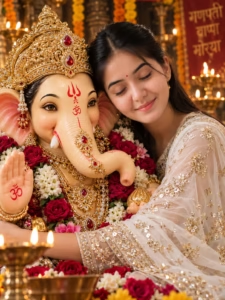
Create a photorealistic close-up devotional portrait of the uploaded young Indian woman.
Use the uploaded photo as the STRICT identity reference. Keep her exact face, facial structure, skin tone, natural features, hairstyle and original age appearance unchanged. Do not beautify, reshape or create an artificial face.
She has long straight black hair, a small red bindi and small gold hoop earrings. Her eyes are gently closed with a peaceful and serene smile.
She is wearing an elegant white sheer ethnic suit with heavy gold sequin embroidery.
Show her affectionately hugging a beautifully crafted Lord Ganesha idol and resting her head gently against the idol.
The Ganesha idol is cream colored with realistic craftsmanship and expressive detailed eyes. It wears a highly ornate golden mukut crown with a red gemstone in the center, red Trishul tilak and Om symbol on the forehead, golden jeweled decoration on the trunk and a raised blessing hand with a red Om symbol on the palm.
Add elaborate golden jewellery and bangles along with fresh red roses and pink and white flower garlands.
Background should be a warm festive temple setting with blurred golden diya lights, marigold decorations and beautiful bokeh.
Soft warm cinematic lighting, shallow depth of field, 85mm lens look, f/1.8, realistic skin texture, premium photography, hyperrealistic, 8K, peaceful devotional Ganesh Chaturthi mood, 3:4 portrait.
CREATE YOUR PHOTO WITH GANESHA
How to Keep Your Face Same in AI Photo
This is one of the biggest problems people face while making AI photos. Sometimes the background and clothes look perfect but the face becomes different.
I also noticed that this usually happens when the reference photo is not clear enough or the prompt does not tell AI clearly to preserve the identity.
For better results, use a photo where your face is clearly visible. Avoid very dark photos, heavy filters and extremely blurry selfies.
Your eyes, nose, lips, jawline and other facial features should be visible properly. A simple natural photo is usually better than a heavily edited photo.
You can also add lines like:
“Use the uploaded photo as the strict identity reference.”
and
“Preserve the exact real face, facial structure, skin tone and natural features.”
These instructions are already included in many prompts above.
But remember, AI image generation can still produce some changes. So if the first result is not correct, try generating it again.
Common Problems While Generating Ganesh Chaturthi AI Photos
While creating these images, some common problems can happen. There is nothing to worry about.
Face Does Not Match
Sometimes AI creates a similar-looking face instead of the exact face. Try using a better and clearer reference photo and repeat the generation.
Hands or Fingers Look Wrong
Hands can sometimes become distorted, especially when the person is praying, holding an idol or touching the face. Generate the image again or simplify the pose.
Ganesha Idol Looks Like Cartoon
If the idol looks like CGI or a cartoon, add words such as professional physical idol, realistic craftsmanship, real fabric, realistic jewellery and photorealistic photography.
Text Becomes Wrong
If you ask AI to add Hindi or Marathi text in the background, sometimes the spelling may not come correctly. If the text is important, check the final image carefully.
Too Much Glow
Sometimes AI adds too much divine glow and makes the photo look artificial. If you want a real photography look, clearly mention natural lighting, realistic exposure and no excessive glow.
Tips to Make Your Ganesh Chaturthi AI Photo More Realistic
I have found some simple things which help a lot while creating these types of images.
First, always use a clear reference photo. This is more important than using a very long prompt.
Second, tell AI about the lighting. For example, you can use warm golden light, soft directional light, sunset light or professional studio lighting.
Third, mention realistic materials. If you want a real Ganesha idol, tell AI about real gold ornaments, fabric, flowers, pearls and physical idol craftsmanship.
Do not add too many random things. Sometimes we try to put everything in one photo and AI gets confused. Keep the main subject clear.
Also mention the camera look if you want a professional photograph. Words like 85mm lens, shallow depth of field, DSLR photography, realistic exposure and natural shadows can help create the photography style you want.
Most importantly, do not expect every generation to be perfect on the first try. Sometimes the second or third result looks much better.
How to Write Your Own Ganesh Chaturthi AI Prompt
If you do not want to copy-paste every time, you can also make your own prompt.
I normally keep a simple structure:
| Part | What to Write |
|---|---|
| Subject | Boy, girl, couple etc. |
| Face | Identity and facial details |
| Outfit | Kurta, saree, traditional dress etc. |
| Ganesha | Idol appearance, dress and jewellery |
| Background | Pandal, temple, home, river etc. |
| Lighting | Golden hour, studio, soft light etc. |
| Camera | DSLR, 85mm, 35mm, portrait etc. |
| Quality | Photorealistic, detailed, 8K etc. |
This makes it easier to write a prompt.
For example, first decide who will be in the photo. Then decide what clothes the person will wear. After that decide where Lord Ganesha will be placed.
Then add the background and lighting. Finally add photography quality.
If these things are explained clearly, AI can understand your idea much better.
Where Can You Use These Ganesh Chaturthi AI Photos?
After creating your image, you can use it in many places.
You can put it as your Instagram profile picture, Facebook post or WhatsApp status. Many people also use these photos for Ganesh Chaturthi wishes and festival posts.
You can also create different versions of the same photo. For example, make one traditional photo, one cinematic photo and one simple devotional photo.
This way your social media will also look different during the festival.
ChatGPT or Gemini – Which One Should You Use?
Both ChatGPT and Gemini can be used for experimenting with AI photo prompts. The most important thing is not only the tool but also the quality of your reference image and the instructions you give.
I recommend trying the same prompt in both tools if you have access to them. Sometimes one result may look better than another depending on the type of image you are creating.
You can simply copy the prompt from this article and try it in the AI image tool you use.
Mistakes to Skip
- Using a low-quality reference photo. It gives the model less to work with — start with something sharp.
- Overloading the prompt. Dozens of instructions at once can bury the details that matter.
- Ignoring hands and reflections. These are the two spots worth double-checking every time.
- Chasing perfection. Flawless skin, symmetry, and lighting all at once can actually look less real. A little imperfection helps.
Conclusion
Ganesh Chaturthi is a festival of devotion, happiness and celebration. Now AI has made it possible to create beautiful festival photos without doing complicated photo editing.
In this article, I shared more than 10 Ganesh Chaturthi prompts for ChatGPT and Gemini. There are prompts for boys, girls, traditional Maharashtrian looks, devotional portraits, Ganesha idol photos and some creative cinematic concepts also.
If your first image does not look perfect, do not worry. Try again with a clear reference photo and make small changes in the prompt.
The most important thing is to keep your face natural and use a good quality reference image. After that, choose your favorite prompt from above and create your own Ganesh Chaturthi AI photo.
I hope these prompts will help you make something beautiful for Ganpati Bappa festival. Try different prompts and see which style looks best on your photo.
Ganpati Bappa Morya! 🙏
Frequently Asked Questions FAQs
What is the best Ganesh Chaturthi prompt for ChatGPT?
A good Ganesh Chaturthi prompt should clearly explain the person, face identity, clothes, Lord Ganesha idol, background, lighting and photography style. You can use any of the prompts given above.
Can I use these Ganesh Chaturthi prompts in Gemini?
Yes, you can try these prompts in Gemini as well as ChatGPT. Upload your reference photo and paste the complete prompt.
How can I make my face look the same in AI photo?
Use a clear reference photo and tell the AI to preserve the exact identity, facial structure, skin tone and natural features. If the first result does not match, try generating again with a better photo.
Which photo is best for AI face matching?
A clear photo with good lighting and a visible face is usually better. Avoid very blurry, dark or heavily filtered photos.
Can I make Ganesh Chaturthi photos for boys and girls?
Yes. The prompts above include different ideas for both boys and girls. You can also modify the outfit, pose and background according to your choice.
Can I make a realistic Lord Ganesha idol using AI?
Yes, you can ask for a professionally crafted physical idol with realistic fabric, jewellery, flowers and material textures. Adding these details can make the idol look more like a real festival photograph.
Why does my AI Ganesha photo look like a cartoon?
This can happen when the prompt does not clearly ask for realistic photography. Add terms such as photorealistic, professional photography, realistic idol craftsmanship, natural lighting and realistic material textures.
How do I make a Ganesh Chaturthi photo look like DSLR photography?
You can mention a professional full-frame camera look, 85mm lens, shallow depth of field, natural exposure, realistic shadows and cinematic lighting in your prompt.
Can I use these prompts for Instagram?
Yes. You can create portrait-style images and use them for Instagram posts, profile pictures, reels covers or stories. Choose the aspect ratio according to where you want to use the image.
What should I do if the first AI image is not good?
Do not worry. Try the same prompt again with a better reference photo. You can also remove unnecessary details or change the pose and lighting slightly. Sometimes the next generation gives a much better result.
Related Reading
ChatGPT – AI Photo Editing & Prompt Ideas
Google Gemini – AI Image Generation
Adobe Firefly – AI Image Generator